search for it

Wednesday, November 9, 2011

Performance / Price for CPUs


This site simply takes the data from cpubenchmark.net, fetches the current prices from newegg.com and makes a nice table.
If the data looks old, start an update - Updated on Tue, 08 Nov 2011 08:03:55 -0800

43.4
38
37.4
36.7
36.6
36.4
36.4
36.3
36
35.7
34.7
34.3
33.3
33.2
33.2
33
33
31.9
31.8
31.8
30.9
30.6
30.3
29.5
29.2
28.6
28
27.8
27.7
27.6
22.6
21.5
20.7
20.4
20.4
19.8
19.7
18.8
8.5
7.3
5.7

Monday, November 7, 2011

ASUS F1A75-V Pro Review


Overview of the ASUS F1A75-V Pro
Having had a play around with the ASUS board for a while, I can tell it feels pretty solid as a platform for A75.  There are a lot of features here, and the system provides the distinct ASUS stability and usability that we expect.
A few points are of note – the second PCIe x16 is actually runs at x4, limiting any dual GPU solutions that don’t use the APU, but on the plus side the board has all six SATA 6 Gbps ports from the FCH and another from an ASMedia controller.  But this seventh would be covered by any long GPU in the first x16 slot.  Also of interest is that this board does not have a Firewire port or header.
Software is good with the ASUS board, with options for the fan controls still being some of the best we have ever seen.  Though as with the F1A75-I Deluxe I reviewed earlier there is a DPC Latency issue when the ASUS Suite II software is run.  The BIOS still covers almost all the bases we want in a BIOS.
Visual Inspection
Out of the anti-static bag, this board feels refined.  The stark black PCB with ASUS blues gives it a sturdy feel.  Instantly noticeable is that the VRM heatsink and the FCH heatsink are connected by a thin heatpipe.  Neither is substantial in size, however spreading the heat from heavy CPU or heavy I/O usage is always a good idea.
Around the socket itself are four fan headers, two above the first PCIe x1, one north of the CPU, and another tucked in beside the 24-pin ATX power connector.  The four DDR3 DIMM slots have alternating latches, with the thicker ones indicating which banks to fill in first.  To the right of the DIMMs we see ASUS’ dual intelligent processor switches, one controlling the EPU (energy saver) and the other being the TPU (turbo unit).  These are now standard on a range of ASUS boards. Rather than a standard switch, personally I would prefer buttons with an LED to indicate if they are on or not.  Next to these is a MEM OK button, which when pressed should default memory settings if they are incompatible or set too high.
Rather than split the 6 FCH SATA 6 Gbps ports between the board and eSATA as the Gigabyte board has done, ASUS have kept all 6 on board and added in an ASMedia SATA controller for a total of 7 ports on the board and one eSATA on the back.  As one would expect, this extra controller does not get included in hardware RAID setups, but the six from the FCH support RAID 0, 1 and 10.  However, the extra SATA port on board is blocked when a full-length GPU is used in the top PCIe x16 slot.
ASUS have stuck with ASMedia in their USB 3.0 controllers, with a header available between the DIMMs and the FCH.  It seems in a slightly odd place, about an inch inside the edge of the board – usually they are placed on the bottom for a back panel connector or near the edge for a front panel connector.  This is definitely in front panel territory, which is a shame that no USB 3.0 front panel device is included with the board, but given this is a ~$120 product, to ask for one would perhaps be asking too much.
Along the bottom are four USB 2.0 headers, as well as the front panel array, a COM header, S/PDIF out and front panel audio.  Above these is the PCIe layout, which differs from the Gigabyte board.  Here we have a PCIe x1, a PCIe x16 (which when populated with a full length GPU would cover the onboard ASMedia SATA port), another PCIe x1, a PCI, another PCIe x16 (electrically limited to x8, hardware limited to x4), and two more PCI slots.
The second PCIe x1 actually shares data lanes with the second PCIe x16, so when using two single lane GPUs for CrossFireX, this PCIe 1x becomes unavailable.  However the first PCIe x1 can still be used.
The back panel is fairly standard with no surprises – a PS/2 connector; two USB 3.0 ports; an optical S/PDIF output; HDMI, DisplayPort, DVI-D and D-Sub video outputs; two USB 3.0 ports; an eSATA 6 Gbps; Gigabit Ethernet (Realtek 8111E); another two USB 2.0 ports and standard audio headers.  I would have liked to see a Clear CMOS button, but with the IO this packed, I do not think there is space for it, unless they removed some features.

Sources: anandtech.com

Corsair Hydro Series: H60, H80 and H100 Reviewed

Introducing Corsair’s Hydro Series: H60, H80 and H100
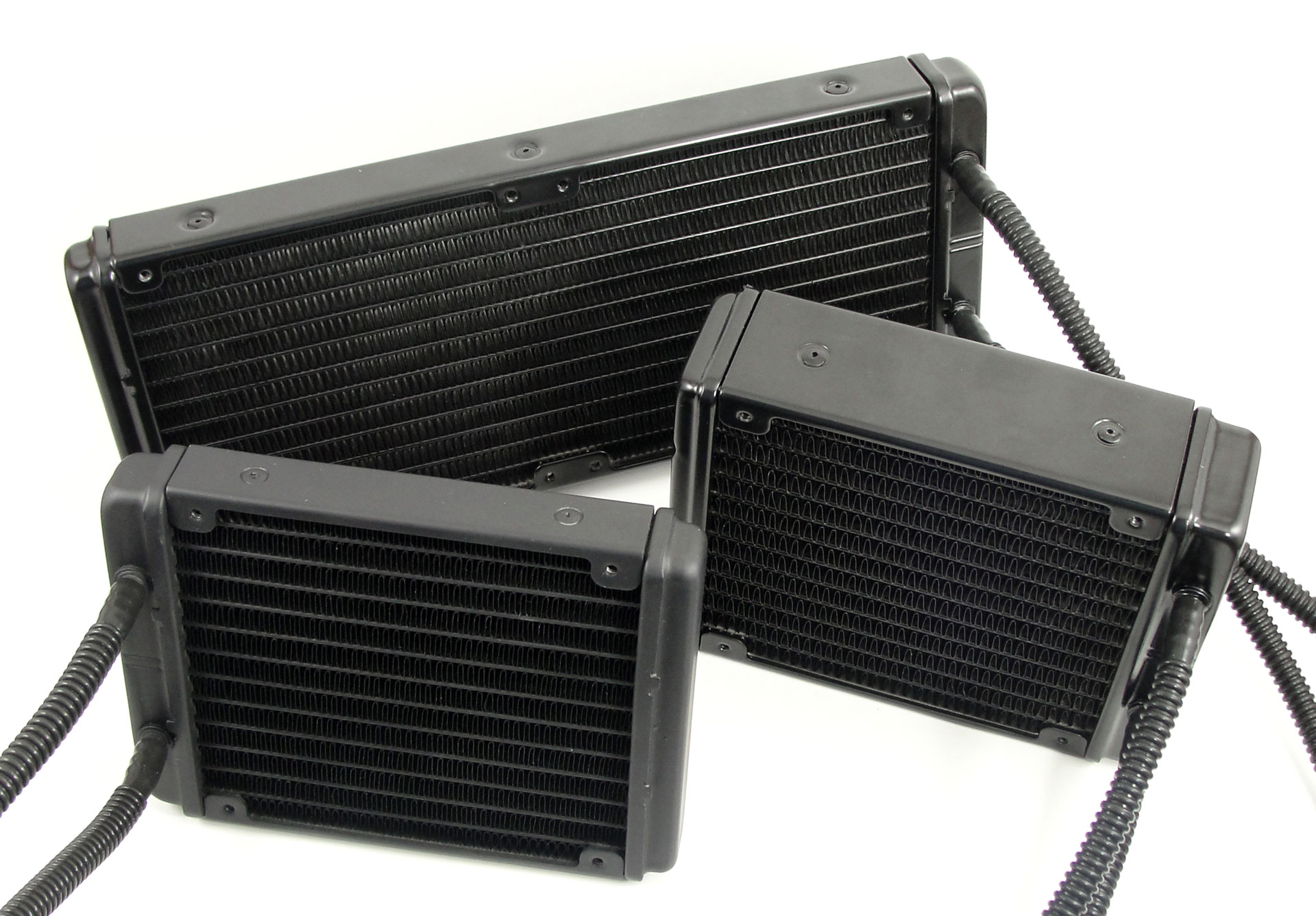
Closed-loop liquid CPU cooling solutions are gaining popularity as more and more vendors are carrying their own variation. We've even seen both Intel and AMD announce the inclusion of liquid-coolers for their upcoming processor lines. Today we're going to take a look at the Corsair Hydro Series H60 High Performance, H80 High Performance, and H100 Extreme Performance liquid CPU coolers. Corsair has teamed up with CoolIT Systems this time around. They have previously partnered with Asetek for other Hydro Series products (H40/H50/H70/H70 Core), but our focus here is on the H60, H80, and H100.
The Corsair Hydro Series of liquid CPU coolers aim to give you the power of liquid-cooling in a compact, easy to install package, without the complexity of traditional water-cooling kits. They are designed to be a closed-loop solution with no maintenance required at all. But just how well do these Corsair liquid-coolers perform against the current cream of the crop air-coolers? After all, Corsair is targeting the high-end air-cooling market with these cooling solutions, both in price and performance. First, let's take a look at the specs for the units being tested today.
Corsair Hydro Series Specifications
H60 H80 H100
Radiator Dimensions 120mmx152mmx27mm 120mmx152mmx38mm 122mmx275mmx27mm
Fan Dimensions 120mmx120mmx25mm 120mmx120mmx25mm (x2) 120mmx120mmx25mm (x2)
Fan Speed (+/- 10%) up to 1700RPM (+/- 10%) up to:
1300RPM (Low),
2000RPM (Medium),
and 2500RPM (High)
(+/- 10%) up to:
1300RPM (Low),
2000RPM (Medium),
and 2500RPM (High)
Fan Airflow / dBA,
Static Pressure
74.4 CFM / 30.2 dBA,
3.2mm/H20
46-92CFM / 22-39 dBA,
1.6-7.7mm/H20
46-92 CFM / 22-39 dBA,
1.6-7.7mm/H20
Cold Plate / Radiator Material Copper / Aluminum Copper / Aluminum Copper / Aluminum
Tubing Low-permeability for near-zero evaporation Low-permeability for near-zero evaporation Low-permeability for near-zero evaporation
Intel Sockets LGA 775, 1155/1156, 1366, 2011 LGA 775, 1155/1156, 1366, 2011 LGA 775, 1155/1156, 1366, 2011
AMD Sockets AM2, AM3 AM2, AM3 AM2, AM3
Warranty Five years Five years Five years
MSRP $79.99 $109.99 $119.99

Saturday, November 5, 2011

Antec HCP-750 80 Plus Gold

Antec HCP-750 Overview and Specifications
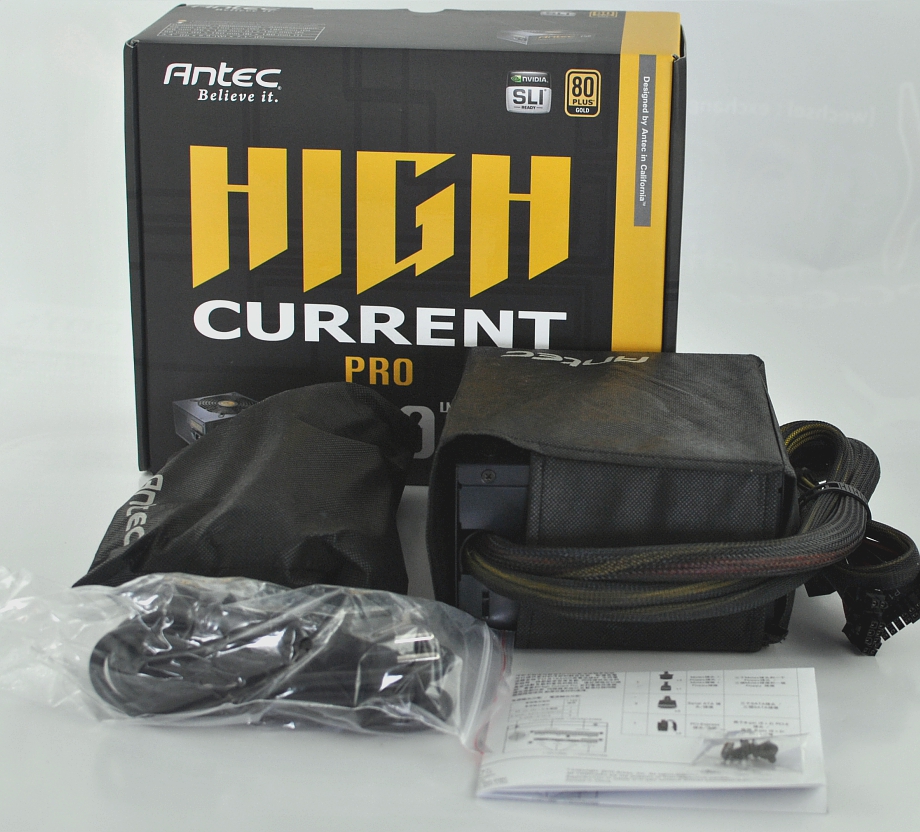
Today we take a look at the Antec HCP-750. Let's start with the delivery contents. Apart from the PSU itself the package includes a power cable, four screws to mount the device in the PC case, a short user guide, and the modular connectors in a separate bag. The HCP is protected from dust and dirt by a bag during shipping. The product features include 80 Plus Gold Certification, the 16-AWG connection cables (large wire cross-section), the 135mm PWM fan, and the gilded connectors. In addition Antec ofers a 5-year warranty, which is a common feature for a product like this.
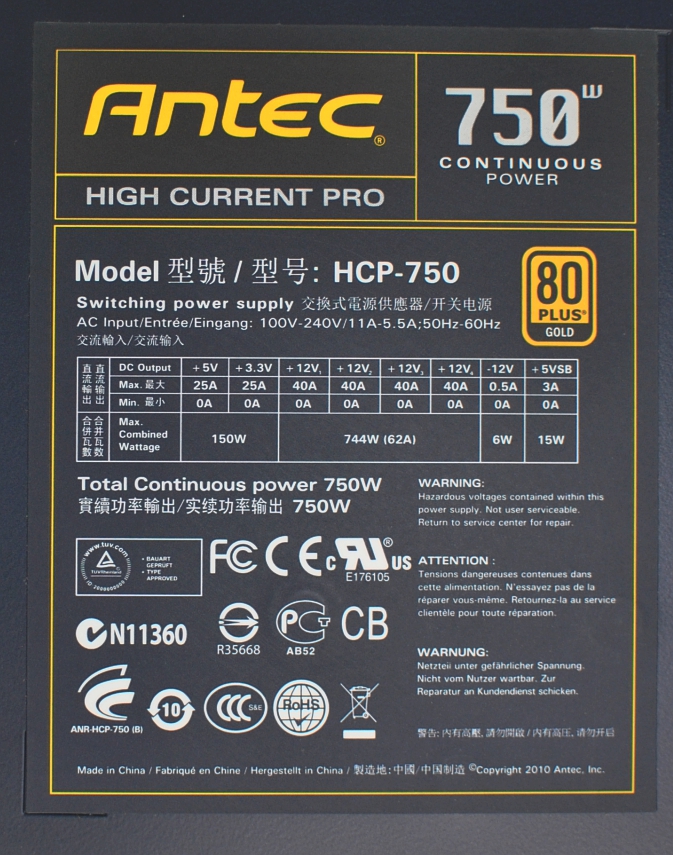
The HCP-750 has four +12V outputs, each of which can be loaded with 40A according to the manufacturer. Almost the full power is provided here because of the DC-to-DC VRM. The +5V and +3.3V combined output is 150W. +5VSB can handle 3A (or 15W), and the label shows the various safety certifications. Antec products can be bought all over the world, so there are many country-specific requirements.
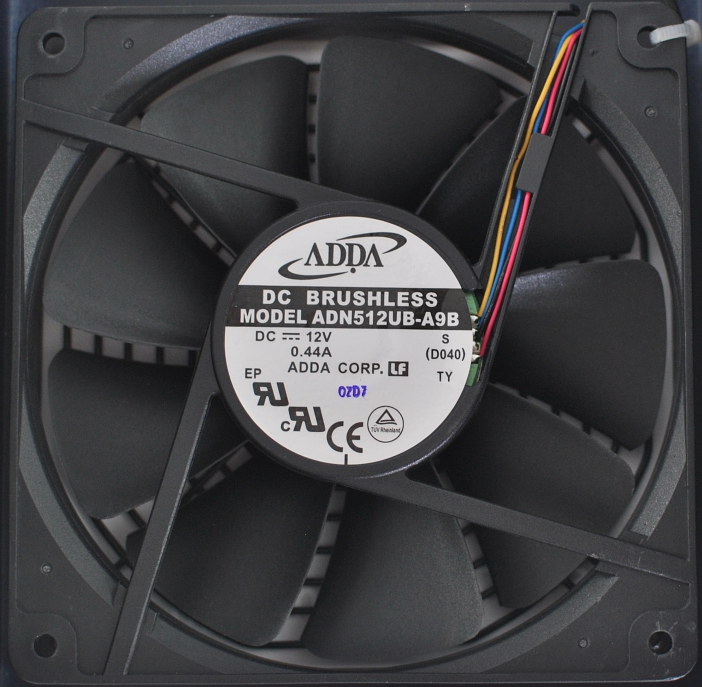
Antec uses a DC fan from ADDA with the model number ADN512UB-A9B. This one is controlled via PWM, so the duty cycle will be modulated. As a Sanyo Denki employee reported at Computex 2011, PWM is much better for the fan than voltage control. However, it should be mentioned that Antec has patented the use of PWM fans in PC power supplies, which complicates their use for other manufacturers. The fan needs 0.44A from the +12V output, and the nine fan blades pictured above are pretty well made.

Source: anandtech.com

AMD Bulldozer Speed Record Broken at 8.58GHz

Maybe with liquid helium, he'll achieve ludicrous speed.

So, about that Guinness World Record-beating clock speed of 8.46 GHz we talked about last week – that's been beaten again.
The very same Andre Yang that achieved that remarkable speed has upped his efforts – and his AMD FX-8150's limits – to an astounding 8.58 GHz.
Yang kept the same Asus Crosshair V Formula motherboard, but this time he cranked the voltage up from 1.992V to 2.076V. This was also done with liquid nitrogen, so it's possible that there's still room for more with the even-more-effective liquid helium.

source: tomshardware.com