search for it

Showing posts with label Hardware. Show all posts

Friday, June 26, 2015

Best Graphics Cards For The Money: June 2015 (VGA Chart)


What about this other card that’s not on the list? How do I know if it’s a good deal or not? This will happen. In fact, because inventory levels and prices change quickly, it’s guaranteed to happen. So how do you know if that card you’ve got your eye on is a good buy in its price range? Here is a resource to help you judge if a card is a good buy or not. The graphics card hierarchy chart groups graphics cards with similar overall performance levels into tiers. The top tier contains the highest-performing cards available, and performance decreases as you go down the tiers from there. You can use this hierarchy to compare the pricing between two cards, to see which one is a better deal, and also to determine if an upgrade is worthwhile. I don’t recommend upgrading your graphics card unless the replacement card is at least three tiers higher. 

Otherwise, the upgrade is somewhat parallel, and you may not even notice any worthwhile difference in performance. At the request of readers, we've added mobile graphics and integrated chipsets to the hierarchy chart. We want to make it clear that there is very little performance data available for these graphics solutions. While the discrete video cards in the chart are placed in tiers based on a lot of information, many of the mobile and integrated devices in the chart are guesstimates based on their specifications. 

At worst, we doubt they’re more than one tier away from their actual performance, but this is something to keep in mind when considering mobile graphics chipsets. - See more at: http://www.tomshardware.com/reviews/gaming-graphics-card-review,3107-7.html#sthash.eumLyC7g.dpuf


Graphics Card Hierarchy Chart
GeForce Radeon Intel
Discrete: GTX Titan Z Discrete: R9 295X2
Discrete: GTX 690, Titan X, 980 Ti Discrete: HD 7990
Discrete: GTX 780 Ti, 980, Titan Black
Discrete: GTX 780, 970, Titan Discrete: R9 290, 290X, 390X, 390
Discrete: GTX 590, 680, 770 Discrete:  HD 6990, 7970 GHz Ed, R9 280X, 380
Go (mobile): 980M
Discrete: GTX 580, GTX 670, GTX 960 Discrete: HD 5970, 7870 LE (XT), 7950, 280, 285
Go (mobile): 970M
Discrete: GTX 660 Ti, GTX 760 Discrete: HD 7870, R9 270, R9 270X, R7 370
Go (mobile): 880M
Discrete: GTX 295, 480, 570, 660 Discrete: HD 4870 X2, 6970, 7850, R7 265,
Go (mobile): 680M, 780M Mobility: 7970M
Discrete: GTX 470, 560 Ti, 560 Ti 448 Core, 650 Ti Boost, 750 Ti Discrete: HD 4850 X2, 5870, 6950, R7 260X
Mobility: 7950M
Discrete: GTX 560, 650 Ti, 750 Discrete: HD 5850, 6870, 7790
Go (mobile): 580M, 675M Mobility: 6990M
Discrete: 9800 GX2, 285, 460 256-bit, 465 Discrete: HD 6850, 7770, R7 260, R7 360
Mobility: 6900M
Discrete: GTX 260, 275, 280, 460 192-bit, 460 SE, 550 Ti, 560 SE, GT 650, GT 740 GDDR5 Discrete: HD 4870, 5770, 4890, 5830, 6770, 6790, 7750 (GDDR5), R7 250 (GDDR5), R7 250E Iris Pro Graphics 6200
Go (mobile): 570M, 670M Mobility: HD 5870, 6800M
Discrete: 8800 Ultra, 9800 GTX, 9800 GTX+, GTS 250, GTS 450  Discrete: HD 3870 X2, 4850, 5750, 6750, 7750 (DDR3), R7 250 (DDR3)
Go (mobile): 560M, 660M Mobility: HD 4850, 5850, 7870M
Discrete: 8800 GTX, 8800 GTS 512 MB, GT 545 (GDDR5), GT 730 64-bit GDDR5 Discrete: HD 4770
Go (mobile): GTX 280M, 285M, 555M (GDDR5) Mobility: HD 4860, 7770M, 7850M
Discrete: 8800 GT 512 MB, 9800 GT, GT 545 (DDR3), GT 640 (DDR3), GT 740 DDR3 Discrete: HD 4830, HD 5670, HD 6670 (GDDR5), HD 7730 (GDDR5)
Go (mobile): 9800M GTX, GTX 260M (112), GTS 360M (GDDR5), 555M (DDR3) Mobility: HD 5770, HD 5750, 6600M/6700M (GDDR5), 7750M
Discrete: 8800 GTS 640 MB, 9600 GT, GT 240 (GDDR5) Discrete: HD 2900 XT, HD 3870, HD 5570 (GDDR5), HD 6570 (GDDR5)
Go (mobile): 9800M GTS, GTX 160M Mobility: 6500M (GDDR5), 6600M/6700M (DDR3), 7730M
Discrete: 8800 GS, 9600 GSO, GT 240 (DDR3) Discrete: HD 3850 512 MB, HD 4670, HD 5570 (DDR3), HD 6570 (DDR3), HD 6670 (DDR3), HD 7730 (DDR3), R7 240
Go (mobile): GTX 260M (96), GTS 150M, GTS 360M (DDR3) Mobility: HD 3870, HD 5730, HD 5650, 6500M (DDR3)
Discrete: 8800 GT 256 MB, 8800 GTS 320 MB, GT 440 GDDR5, GT 630 GDDR5, GT 730 128-bit GDDR5 Discrete: HD 2900 PRO, HD 3850 256 MB, 5550 (GDDR5)
Go (mobile): 8800M Mobility: HD 3850
Discrete: 7950 GX2, GT 440 DDR3, GT 630 DDR3, GT 730 128-bit DDR3 Discrete: X1950 XTX, HD 4650 (DDR3), 5550 (DDR3)
Integrated: HD 7660D
Discrete: 7800 GTX 512, 7900 GTO, 7900 GTX, GT 430, GT 530 Discrete: X1900 XT, X1950 XT, X1900 XTX 
Go (mobile): 550M
Discrete: 7800 GTX, 7900 GT, 7950 G, GT 220 (DDR3) Discrete: X1800 XT, X1900 AIW, X1900 GT, X1950 Pro, HD 2900 GT, HD 5550 (DDR2)
Go (mobile): 525M, 540M Integrated: HD 7560D
Discrete: 7800 GT, 7900 GS, 8600 GTS, 9500 GT (GDDR3), GT 220 (DDR2) Discrete: X1800 XL, X1950 GT, HD 4650 (DDR2), HD 6450, R5 230
Go (mobile): 7950 GTX Mobility: X1800 XT, HD 4650, HD 5165, 6400M
Integrated: HD 6620G, 6550D, 7540D
Discrete: 6800 Ultra, 7600 GT, 7800 GS, 8600 GS, 8600 GT (GDDR3), 9500 GT (DDR2)  Discrete: X800 XT (& PE), X850 XT (& PE), X1650 XT, X1800 GTO, HD 2600 XT, HD 3650 (DDR3), HD 3670 Integrated: Intel HD Graphics 4000
Go (mobile): 7800 GTX, 7900 GTX Mobility: X1900, 3670 
Integrated: 6520G, 6530D, 7480D
Discrete: 6800 GT, 6800 GS (PCIe), 8600 GT (DDR2), GT 520 Discrete: X800 XL, X800 GTO2/GTO16, HD 2600 Pro, HD 3650 (DDR2), 
Go (mobile): 7800, Go 7900 GS, 520M, 520MX Mobility: X800 XT, HD 2600 XT, 3650 
Integrated: 6410D, 6480G
Discrete: 6800 GS (AGP) Discrete: X800 GTO 256 MB, X800 PRO, X850 Pro, X1650 GT
Go (mobile): 6800 Ultra, 7600 GT, 8600M GT, 8700M GT, 410M Mobility: HD 2600 
Integrated: 6370D, 6380G
Discrete: 6800, 7300 GT GDDR3, 7600 GS, 8600M GS  Discrete: X800, X800 GTO 128 MB, X1600 XT, X1650 Pro
Go (mobile): 6800, 7700 Mobility: X1800, HD 5145, HD 5470 (GDDR5)
Discrete: 6600 GT, 6800LE, 6800 XT, 7300 GT (DDR2), 8500 GT, 9400 GT  Discrete: 9800 XT, X700 PRO, X800 GT, X800 SE, X1300 XT, X1600 PRO, HD 2400 XT, HD 4350, HD 4550, HD 5450 Integrated: Intel HD Graphics 3000
Go (mobile): 7600 (128-bit) Mobility: X800, 3470, HD 5470 (DDR3), HD 5450, HD 5430, 6300M
Integrated: HD 6310, HD 6320
Discrete: FX 5900, FX 5900 Ultra, FX 5950 Ultra, 6600 (128-bit) Discrete: 9700, 9700 Pro, 9800, 9800 Pro, X700, X1300 Pro, X1550, HD 2400 Pro
Go (mobile): 6800 (128-bit) Mobility: X1450, X1600, X1700, 2400 XT, X2500, 3450
Integrated: 9300, 9400 Integrated: HD 3200, HD 3300, HD 4200, HD 4250, HD 4290, HD 6250, HD 6290 
Discrete: FX 5800 Ultra, FX 5900 XT Discrete: 9500 Pro, 9600 XT, 9800 Pro (128-bit), X600 XT, X1050 (128-bit) Integrated: Intel HD Graphics (Core i5-6x1), 2000
Go (mobile): 6600, Go 7600 (64-bit) Mobility: 9800, X700, X1350, X1400, X2300, HD 2400
Discrete: 4 Ti 4600, 4 Ti 4800, FX 5700 Ultra, 6200, 8300, 8400 G, G 210, G 310 Discrete: 9600 PRO, 9800 LE, X600 PRO, HD 2300 Integrated: Intel HD Graphics (Core i3 5x0, Core i5-6x0)
Go (mobile): 315M Mobility: 9700 (128-bit), X600, X1300
Integrated: Xpress 1250
Discrete: 4 Ti4200, 4 Ti4400, 4 Ti4800 SE, FX 5600 Ultra, FX 5700, 6600 (64-bit), 7300 GS, 8400M GS, 9300M G, 9300M GS Discrete: 9500, 9550, 9600, X300, X1050 (64-bit)  Integrated: Intel HD Graphics (Pentium G)
Mobility: 9600
Discrete: 3 Ti500, FX 5200 Ultra, FX 5600, FX 5700 LE, 6200 TC, 6600 LE, 7200 GS, 7300 LE Discrete: 8500, 9100, 9000 PRO, 9600 LE, X300 SE, X1150 Integrated: GMA X4500
Go (mobile): 5700, 8200M, 9200M GS, 9100 Mobility 9700 (64-bit)
Integrated: 8200, 8300
Discrete: 3, 3 Ti200, FX 5200 (128-bit), FX 5500,  Discrete: 9000, 9200, 9250
Go (mobile): 5600, 6200, 6400, 7200, 7300, 7400 (64-bit) Mobility: 9600 (64-bit), X300
Discrete: FX 5200 (64 bit) Discrete: 9200 SE Integrated: GMA X3000, X3100, X3500
Go (mobile): 7200, 7400 (32-bit) Integrated: Xpress 200M, Xpress 1000, Xpress 1150
Integrated: 6100, 6150, 7025, 7050
Discrete: 2 GTS, 4 MX 440, 2 Ultra, 2 Ti, 2 Ti 200 Discrete: 7500 Integrated: GMA 3000, 3100
Discrete: 256, 2 MX 200, 4 MX 420, 2 MX 400 Discrete: SDR, LE, DDR, 7000, 7200 Integrated: GMA 500, 900, 950
Discrete: Nvidia TNT Discrete: Rage 128 Discrete: Intel 740


Now all that’s left to do is compare performance to your budget, and you'll be able to confidently decide which board is right for you - we even put in the legwork to help find you the best prices! - See more at: http://www.tomshardware.com/reviews/gaming-graphics-card-review,3107-7.html#sthash.eumLyC7g.dpuf

Source: Tom's Hardware

Tuesday, August 28, 2012

Gigabyte Launches Flagship Z77X-UP7 Motherboard

Gigabyte's latest motherboard features a robust 32+3+2 power design using Ultra Durable 5 high current capable components.


On Monday Gigabyte announced the release of its current flagship motherboard, the Z77X-UP7. It offers a robust 32+3+2 power design (32 CPU phases, 3 Intel HD Graphics, 2 VTT phases) using Ultra Durable 5 high current capable components including 60A rated IR3550 PowIRstages chips from IR. This high phase count allows the board to share the workload between 32 phases, ensuring lower working temperatures and maximum CPU power delivery.
"With the Z77X-UP7 and its 32+3+2 power phase design featuring Ultra Durable 5 technology, we have created the very best CPU power design of any motherboard available today,” commented HiCookie, Gigabyte In-house Overclocking Expert. "Not only does this help extreme overclockers to reach 7 GHz+ on their Intel Core i7-3770K CPUs and take down benchmark records, but it also provides System Integrators with a platform cool and stable enough to withstand the rigors of an always-on, overclocked water cooled system for their customers."
Featuring an LGA 1155 CPU socket and the Intel Z77 chipset, the motherboard supports Intel 22-nm 3rd and 2nd generation Core CPUs. It also has four slots for 2 channel DDR3 RAM sticks, ten USB 3.0 ports, four USB 2.0 ports, six SATA 3 connectors and four SATA 2 connectors. It also offers PCI Express 3.0 x8 connectivity on 4 slots, supporting both 4-way ATI CrossFireX and Nvidia SLI configurations, or PCI Express 3.0 x16 connectivity using 2 slots.
"The Z77X-UP7 delivers ultra smooth 3D rendering, blazing-fast frame rates and enhanced graphics capabilities for users wanting to get the highest levels of graphics performance from their system, Gigabyte said on Monday. "The Single black PCI Express x16 slot provides a direct link to the CPU, enabling it to bypass the PLX chip. This provides the fastest possible connection for single graphics card benching."
The board also features an exclusive in-house designed UEFI BIOS sporting a GUI capable of 32-bit color imaging and user-friendly mouse navigation. The BIOS also provides two different levels of access, depending on the end-user: 3D mode for novice and casual users, and a more comprehensive Advanced Mode designed specifically for overclockers and power users. The 3D mode is a bit more simplistic so that it's easier to understand how the BIOS functions, and how each setting affects the motherboard.
"At the heart of this exciting 3D BIOS technology is a pair of physical BIOS ROMs containing Gigabyte’s exclusive in-house designed Dual UEFI BIOS technology, featuring the patented Gigabyte DualBIOS technology that automatically recovers BIOS data when main BIOS has crashed or failed," the company said.
For overclockers, the OC-Touch buttons allow overclockers to manually adjust the CPU ratio, BCLK settings as well as adjustments to the BCLK stepping ratio, to either 1 MHz or 0.3 MHz increments. These changes can be made in real-time, whether in BIOS, DOS, or Windows without the need for rebooting. Also included are onboard voltage measurement modules, and an onboard LN2 Mode switch for dropping the CPU frequency to x16 multiplier during extreme overclocking.
For more information about Gigabyte's new Z77X-UP7 Windows 8-ready motherboard, head here.

Source: Tom's Hardware

Sunday, December 11, 2011

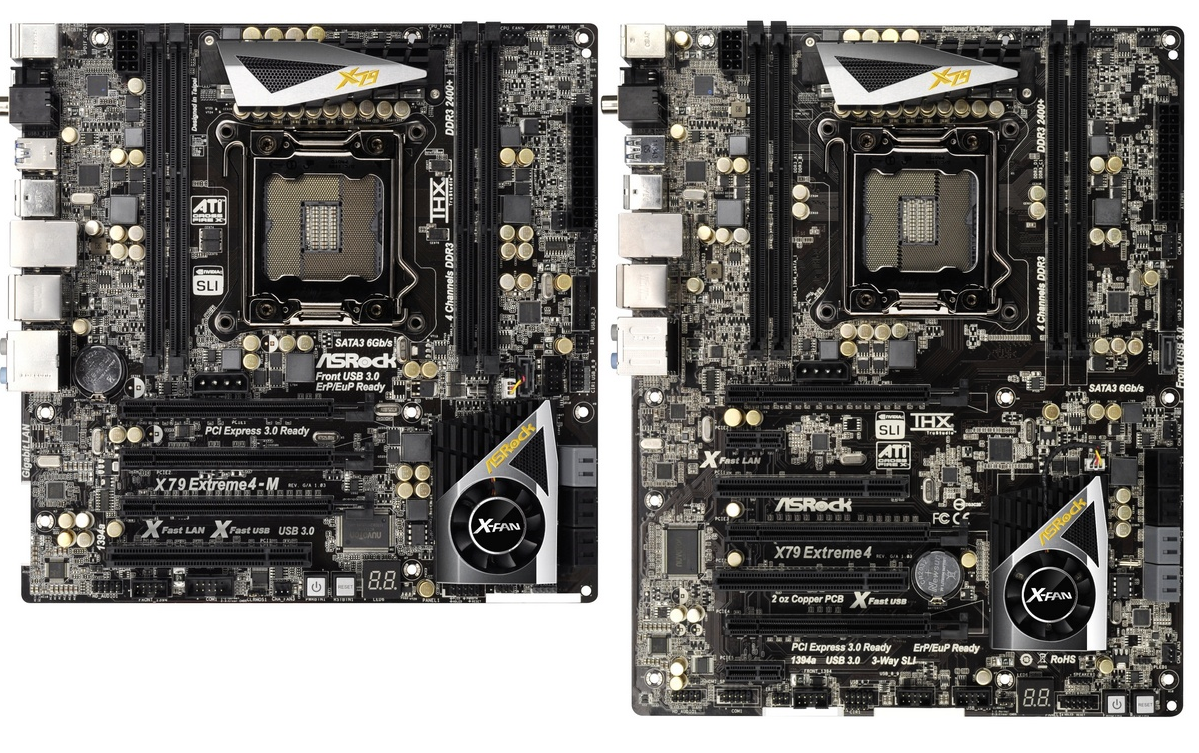
ASRock X79 Extreme4-M and X79 Extreme4 Review – Sandy Bridge-E meets mATX

In our series of X79 reviews, the next boards to face scrutiny are a pair of ASRock boards – the X79 Extreme4-M, one of the first mATX solutions to X79, and the X79 Extreme4, a full size ATX model.  The main interesting point to consider starts with whether the power consumption and heat generation are applicable to the Sandy Bridge-E platform in a mATX format.  With the socket and quad channel memory taking up serious PCB real estate, it is interesting to see how ASRock have tackled heat dissipation issues.  We also compare the Extreme4-M to the Extreme4, its bigger brother.  Both boards offer amazing value in X79 land, coming in at a recommended retail of $224.99 and $234.99 respectively.
In terms of the initial ASRock release into the world of X79, we are promised five boards ranging from the value X79 Extreme3, the mATX Extreme4-M, to the premium Extreme9.  ASRock have never made an ‘Extreme9’ board before – perhaps they are looking at Gigabyte’s UD9 advertising and wanting some of that.  The other aspect is that typical high end ASRock boards (barring the Fatal1ty editions) are usually priced in the mid range area of other SKU lists, with performance and utilities to match.
A simple comparison between the boards gives us the following:
ASRock X79 Series
  Extreme3 Extreme4-M Extreme4 Extreme7 Extreme9
Release Date Dec 2011 Nov 2011 Nov 2011 Soon Nov 2011
Price $216 $225 $235 $294 $355
Size ATX Micro ATX ATX ATX ATX
Power Phase 5+1 6+2 6+2 12+2 16+2
Memory 4 x DDR3 4 x DDR3 4 x DDR3 6 x DDR3 8 x DDR3
PCIe x16/x16/x8 x16/x8/x16 x16/x16/x8 x8/x8/x8/x8/x8
x16/-/x16/-/x8
x8/x8/x8/x8/x8
x16/-/x16/-/x8
CrossfireX 2x, 3x, 4x 2x, 4x 2x, 3x, 4x 2x, 3x, 4x 2x, 3x, 4x
SLI 2x, 3x, 4x 2x, 4x 2x, 3x, 4x 2x, 3x, 4x 2x, 3x, 4x
Audio ALC 898 ALC 898 ALC 898 ALC 898 Creative Sound
Core3D
LAN Single Single Single Dual Dual
SATA 6 Gbps 3 4 5 7 8
USB 3.0 4 4 4 6 8
USB 2.0 12 10 12 12 12
XFast Software Yes Yes Yes Yes Yes
Digital PWM Yes Yes Yes Yes Yes
Dr. Debug - Yes Yes Yes Yes
There are some interesting points to make from this table.  For a start, the prices of the entry level boards start to resemble something for the mild enthusiast, especially when considering the cheaper processor SKUs due to ship in Q1 2012.  Each of the boards as we go up the scale seems to offer more in the way of features, especially when considering NICs, SATA 6 Gbps ports, USB 3.0 and USB 2.0 – even the Audio jumps from a Realtek ALC898 to a Creative solution on the Extreme9.
One thing that may seem a little odd is the X79 Extreme7, and its DDR3 solution.  X79 and Sandy Bridge-E supports quad channel memory, either in terms of one DIMM per channel or two DIMMs per channel, and thus boards would expect to have 4 DIMM slots or 8.  The X79 Extreme7 has six DIMM slots for memory, so I had to ask ASRock for an explanation of the layout and the reasoning.  Essentially, they wanted to make a board for people who are jumping from X58 to X79, who were using six sticks of good tri-channel memory.  The layout is such that two channels are one DIMM per channel, and the other two channels are two DIMMs per channel.  ASRock assures me there are no compatibility or speed issues.

All the boards are sporting black aesthetics, which is a somewhat detour to ASRock’s blue and white philosophy of old.  As expected, all the boards will receive the range of software including XFast USB, XFast LAN, and the new XFast RAM, some of which we have seen before.
So without further ado, let us get cracking onto the specifics behind the X79 Extreme4-M and X79 Extreme4.


Overview
I was not too sure what to expect from the X79 Extreme4-M.  One of the biggest LGA2011 features, 40 PCIe lanes, would not be fully exploited by the mATX layout.  I then looked at the retail price, and compared to other boards we have looked at, could come in at quite a steal.  For users who want pure CPU/memory throughput and are not too concerned with the PCIe layout could pick up a cheap mATX board and an LGA2011 CPU to get the best performance in minimal space.
However, all is not as it seems with the X79 Extreme4-M.  To be honest, I only had two major issues with the board – the first being the overclocking.  ASRock usually cater users well in this department, offering a wide range of choices in BIOS for a user to select.  However, Intel has a feature whereby if a user requires a Turbo mode for a substantial period of time, in order to preserve life and reduce heat, the CPU will clock back.  In previous experience on other motherboards, this is automatically disabled on any sort of overclock.  However, there is not an option here, and the CPU will go back to below stock CPU frequency at high stresses.  I will explain in more detail later.  The second point is the default fan speed, which is at 100% for the CPU, potentially causing noise issues.
Feature wise, the user is well catered for at this price range – there are a SATA 6 Gbps controller and a USB 3.0 controller are added on top of the default chipset, six fan headers onboard, and the range of software provided under the ASRock banner is quite good.  XFast USB is a nice technology to boost a single USB socket throughput (as tested in the review), XFast LAN allows the user to manipulate packet priority and monitor network usage, and a new addition to the scene, XFast RAM, which allows users to create a RAMDisk for quick temporary file storage.
At $224.99, we are starting to see more agreeable prices for X79 motherboards, which can only be a good thing as long as we are getting as much of the benefit of the new platform as possible.  The ASRock X79 Extreme4-M has a few teething issues to begin with, especially at any sort of significant full CPU load plus overclock, which could put a dampener on prospective sales.
Visual Inspection

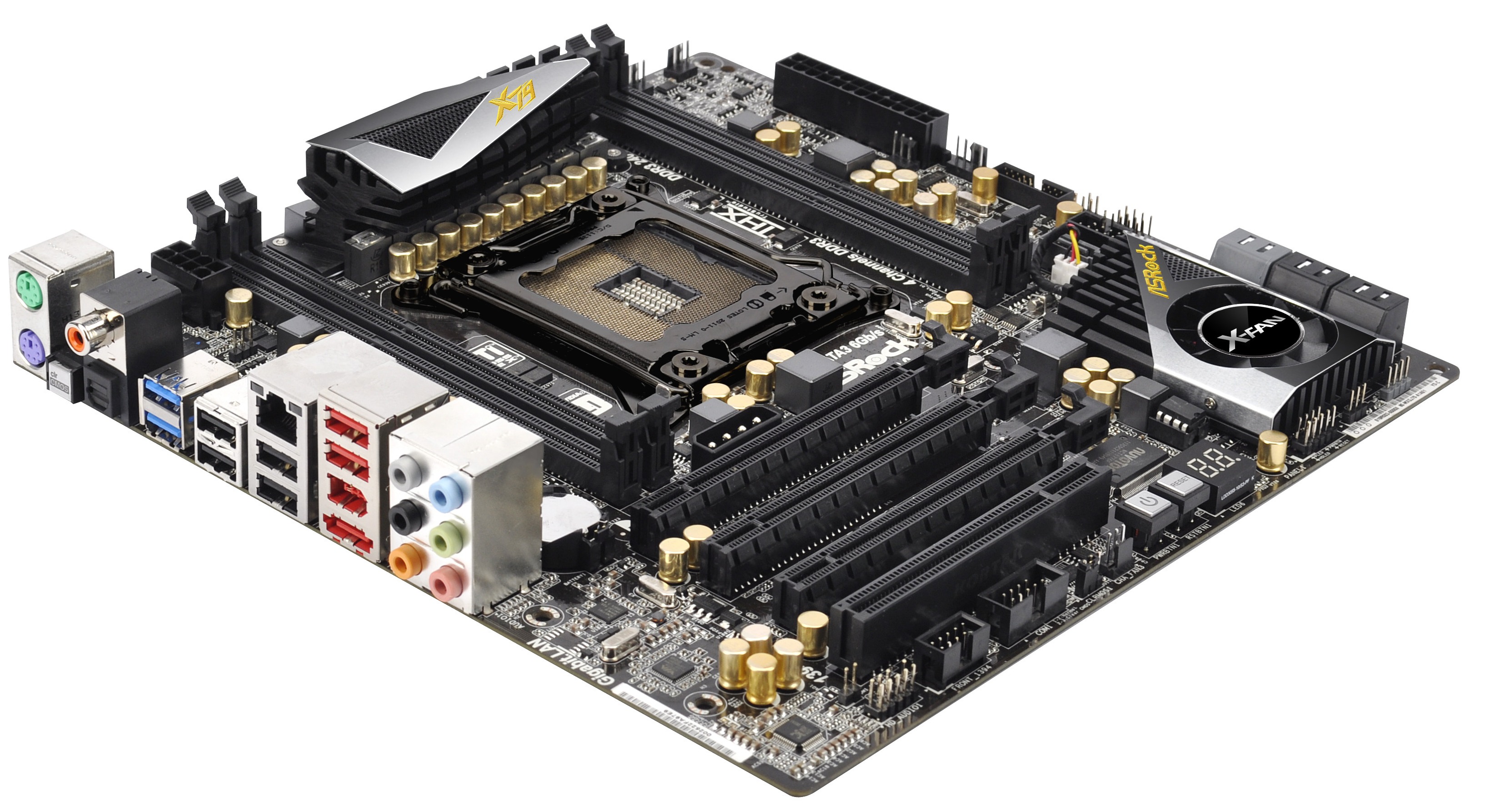
If ASRock were going for the ‘black gold’ metaphor of valuable commodities, they have at least got the styling right, with all black ports (bar two grey SATA) and gold caps everywhere, splashed with gold writing on the heatsinks.  In order to save space, we have only got 4 DIMMs here, which equates to one per channel.  Despite this extra ‘room’, there is a lack of significant extra features on board, such as beefier heatsinks or extra ports.  The 6+2 phase power solution is behind the very small (13/16ths of an inch x 3.5 inch) heatsink which gets extremely hot to touch under full load even at stock – it may have been wise for ASRock to extend this heatsink via a heatpipe to take advantage of the extra space.
One thing we can enjoy though is the abundance of fan headers for a mATX board – the X79 Extreme4-M has six of them.  There are two CPU fan headers north of the right bank of memory slots, along with a power header.  Two of the three chassis headers are beside the 24-pin ATX power connector (presumably for front chassis fans), and the other is on the bottom end of the board next to the power/reset switches.  Control of these is through the BIOS, or the ASRock eXtreme Tuning Utility (AXTU) software in the operating system.
Alongside the 24-pin ATX power connector is a USB 3.0 header, and a seventh SATA port from an ASMedia controller.  This controller also gives an eSATA 6 Gbps port at the back of the IO panel.  Beside these are the six SATA ports from the PCH, four SATA 3 Gbps (black) and two SATA 6 Gbps (grey).  These are all shadowed by the chipset cooler, also in black and gold livery, sporting a small ‘X-Fan’.  This is more substantial than other chipset coolers we have seen (which often use a heatpipe to transfer heat to another heatsink), and the default setting is that the fan only turns on when it reaches 50ºC.  Personally, I didn’t hear it, because the CPU fan defaults at maximum speed.

The bottom end of the board sports the power/reset/debug LED trio I love, alongside headers for the Clear CMOS, COM and IEEE 1394.  Above these is the PCIe layout, which tries to maximize the 40 PCIe lanes as much as possible.  In order, we have an x16, x8 and x16, and PCI, but in reality dual GPU users will populate slots one and three to get their maximum throughput.  The layout does bode well for users of one GPU and another PCIe device, though probably at the expense of cooling – ideally the PCIe device would be in the first slot and the GPU in the second or third slots for optimum efficiency.  Users will also note the additional 4-pin molex power connector on board to aid in power to the PCIe slots.  I was able to run dual GTX580s, without issue, with having nothing plugged into the molex connector.  This raises some issues – a) is it really necessary and b) if it is, are other power connectors not suitable?  A 4-pin molex is quite substantial to put into the board over other components, especially when devices typically using 4-pin molex connectors are not anywhere near this part of the board.
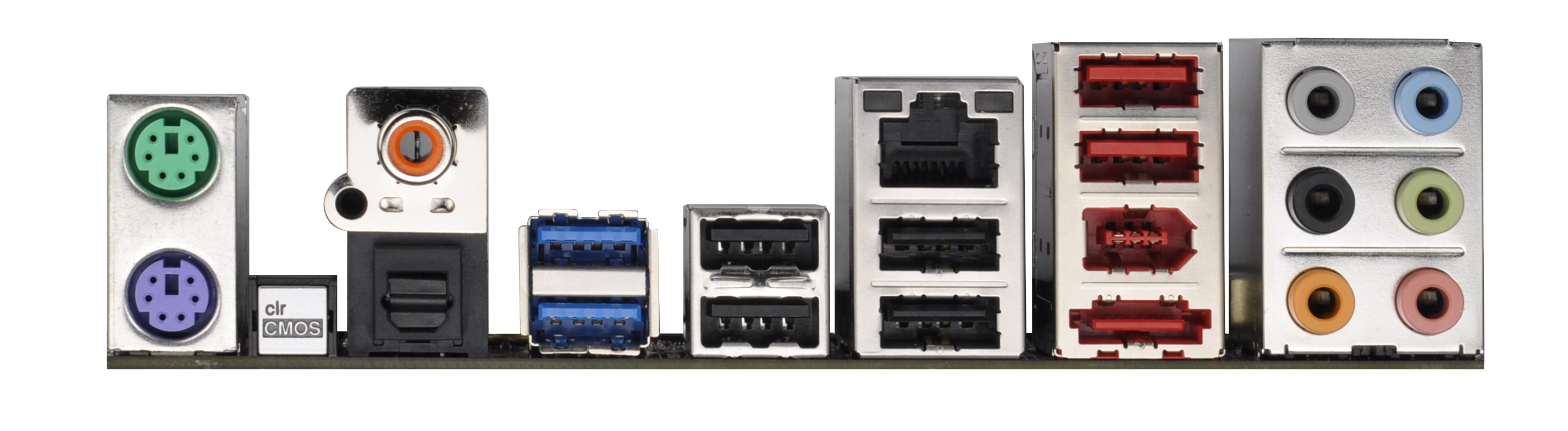
The IO panel is pretty standard, especially in comparison to most of the Cougar Point chipset motherboards we have seen this year.  From left to right, we see two PS/2 connectors, a clear CMOS button, a coaxial SPDIF out, an optical SPDIF out, two USB 3.0 ports, six USB 2.0 ports, gigabit Ethernet (Broadcom BCM57781), eSATA 6 Gbps, FireWire, and audio headers.  For a board this price and on X79, we do not see much extra from what we would expect to be the standard.

In The Box
Back in the P67 days, if you remember the P67 Extreme4 by ASRock, for ~$160, we got a substantial haul in the box, including a front panel USB 3.0 panel and SSD holder.  No such luck for the low end here, as we have:
2 x SATA Cables
IO Panel
Driver CD
2 Slot SLI Bridge
I am a little disappointed to be honest, given ASRock’s previous tenacity when it comes to box bundling.
Board Features
ASRock X79 Extreme4-M
Size mATX
CPU Interface LGA2011
CPU Support Intel Second Generation Core i7 Sandy Bridge E
Chipset Intel X79
Base Clock Frequency 100.0 MHz
Core Voltage Default, 0.6 V to 1.7 V
CPU Clock Multiplier Auto, 12x to 60x
DRAM Voltage Auto, 1.207 V to 1.806 V
DRAM Command Rate Auto, 1N to 3N
Memory Slots Four DDR3 DIMM slots supporting up to 32 GB
Up to Quad Channel
Support for DDR3, 800-2400 MHz
Expansion Slots 2 x PCIe Gen 3 x16
1 x PCIe Gen 3 x8
1 x PCI
Onboard SATA/RAID 2 x SATA 6 Gbps, Support for RAID 0, 1, 5, 10
4 x SATA 3 Gbps, Support for RAID 0, 1, 5, 10
1 x SATA 6 Gbps (Controller)
Onboard 4 x SATA 3 Gbps (PCH)
3 x SATA 6 Gbps (2 PCH, 1 Controller)
6 x Fan Headers
1 x 4-pin Molex CFX/SLI Power Connector
1 x HDMI_SPDIF Header
1 x Front Panel Header
1 x Front Panel Audio Header
2 x USB 2.0 Headers
1 x USB 3.0 Header
1 x COM Header
1 x IEEE 1394a Header
Power / Reset / Clear CMOS Buttons + Debug LED
Onboard LAN Broadcom BCM57781 Gigabit LAN
Onboard Audio Realtek ALC898
7.1 Ch HD, Supports THX TruStudio
Power Connectors 1 x 24-pin ATX connector
1 x 8-pin 12V connector
1 x 4-pin Molex CFX/SLI Power Connector
Fan Headers 2 x CPU Fan Header
3 x Chassis Headers
1 x SB Header (occupied)
IO Panel 1 x PS/2 Mouse Port
1 x PS/2 Keyboard Port
1 x Optical S/PDIF Out Port
1 x Coaxial S/PDIF Out Port
6 x USB 2.0
2 x USB 3.0
1 x eSATA 6 Gbps
1 x Gigabit Ethernet
1 x Firewire
1 x Clear CMOS
Audio Jacks
BIOS Version 1.4
Warranty Period 2 Years
ASRock are starting to use Broadcom NICs on their products, as you will see with the Extreme4 later in this review and the Extreme9 in a later review.  As mentioned in the intro, it is nice to see a high end Realtek Audio Codec in there, even on a mATX board.  On the flip side, with the 4-pin molex CFX/SLI power connector on board in an odd position, one has to wonder whether it is really needed when other boards do not require it.
Overclocking
Over this year, I have had a number of ASRock Sandy Bridge boards through my hands.  On the whole, they tend to overclock well with one button settings, even if not able to overclock to the absolute extreme.  This is usually useful for system builders or amateur users wanting some extra bang for their buck.  But as we have already seen on the Patsburg chipset, these LGA2011 chips are hot beasts waiting to be tamed.  In order to keep everything the same, we are testing the same exact processor on the exact same cooling – the Intel All-In-One Liquid Cooler.
Initial impressions for the X79 Extreme4-M looked good, however it does suffer from various throttling modes to prevent high temperatures.  What I mean by this is that if you set the processor frequency high enough, and the cooler cannot deal with it properly (either it is not a good cooler, or clogged with dust), the system will reduce the multiplier to compensate for temperature.  This is all well and good on the majority of systems, however there was no option to turn it off in the BIOS (think extreme overclocking, or perhaps just experienced users).  So for example, if we set 4.6 GHz in BIOS, it would run at that speed in single threaded scenarios, but in multi-threaded tasks it would reduce back to 3.9 GHz.  Then, as per Intel specifications, the CPU would reduce to stock (3.3 GHz) if it was at full load for a certain time.  There seemed to be no way to turn any of these options off – the last point for 3.3 GHz is usually controlled by a timer stating how long Turbo can be engaged, but ASRock have not offered an option to disable it for ‘safety’.  Each to their own, but it really hurts anyone who overclocks the system.  The only way around this reduction to 3.3 GHz seemed to be to leave the CPU at stock frequencies, then it would only reduce to 3.6 GHz, as per Turbo core rules.  It is rather disappointing.
Nevertheless, I did go through the Auto and Manual OC tasks as usual to see what was possible.  In our Auto tests, we keep everything untouched as much as possible except the one setting.  During our manual OC of X79, we set a CPU voltage limit of 1.4 V for a balance of performance and temperature.
In Auto OC mode, the BIOS offers several options from 4.0 GHz to 5.2 GHz in 200 MHz jumps, with the final three in a red font, showing their ‘extreme’ nature.  I was able to start at 4.8 GHz; however the automatic settings on board gave the CPU 1.54 volts!  This was quite extreme, resulting in throttling almost immediately, but still reaching 83ºC in our multithreaded 3DPM test, with 3.3 GHz scores.
At 4.6 GHz, these issues still persisted, and the CPU was still receiving 1.54 volts.  However at 4.4 GHz, the system seemed stable, even if the CPU was getting 1.48 volts.  No throttling took place, until the turbo period was up and the CPU cut back to 3.3 GHz.
In terms of Manual OC, I set the board to give the CPU 1.4 volts, and rose the Core Current Limit to 500A, to stop as much throttling as possible.  Using this, I was able to reach a 47x multiplier, giving 4.7 GHz.  In the OS, the CPU was recorded as receiving 1.456 volts at load, presumably due to load line calibration.  At full multithreaded load, the CPU would reduce back to 3.9 GHz, and reach 71ºC when under 3DPM.  After the allotted turbo time, the CPU would again reduce back to 3.3 GHz.
For the memory overclock, this was a bit frustrating.  I am currently using a 4x4 GB set of GSkill RipjawsZ (DDR3-2133 9-11-9-28 1.65 V), in which I have had them running at 2752 MHz (even though at silly timings of 13-13-14, but still with 1.65 V) with Llano.  However, it seems the Integrated Memory Controller with my LGA2011 chip is not that good.  While we were able to set our XMP profiles on the memory, the next divider up was at DDR3-2400.  In order to be comparable to XMP, I reduced the timings to 10-12-10-31 2T, but after one successful boot, it failed to get into the OS after many attempts, and thus is not stable.

source: AnandTech

Monday, November 21, 2011

ECS EliteGroup X79R-AX Motherboard Review

The Intel X79 Express Chipset is finally here and every competitor is releasing motherboards exclusively for it. ECS EliteGroup is just one of the major competitors we will be looking at today. They have released their X79R-AX motherboard and it is coming to the market as an entry level motherboard. It comes with great features and a smaller price tag so you can enjoy the new chipset without breaking your wallet.
Since this is a motherboard specifically designed for the new Intel X79 Express Chipset, let’s go over some of the features of this new chipset. First off, it supports the 2nd Gen Intel core i7 and the Intel Core Family Processors in the LGA 2011 Sandy Bridge-E Processors. It is also designed to connect to a DMI interface to peripheral devices. This allows a direct interface between the Intel northbridge and southbridge. What will disappoint some enthusiasts is that their new line of X79 motherboards will not include Intel’s Smart Response Technology.

Other main improvements with this new chipset includes Performance Overclocking, PCIe based Uplink to processor, Up to 8PCIe lanes from PCH, and up to 14 SATA connections (10 ports at 6 Gb/s and/or 8 ports supporting SATA and SAS). Intel has also included Quad Channel DDR3 memory and an overclock memory speed of up to 2666MHz. However, don’t get hyped up on the Quad Channel because in reality it’s just 4 Dual Channel memory sticks. With the addition of these new motherboards will be seeing a lot more SATA ports not only because of the increased allowable connections but also Intel’s Rapid Storage Technology. All these features allow users to easily overclock their motherboards and get higher efficiencies as well. Also, having extra SATA 6Gb/s ports never hurt anyone and it will definitely make use all of the fast transfer speeds of SSDs in the market.

Thursday, November 17, 2011

Sandy Bridge-E: Core i7-3960X Is Fast, But Is It Any More Efficient?

Ironically, when it comes to performance, Intel’s Core i7-3960X is the real Bulldozer. Since its power consumption levels are lower than the Gulftown-based Core i7, it should also deliver amazing performance per watt as well. Is that really the case?
Intel's Sandy Bridge-E design takes the company's 32 nm Sandy Bridge architecture to the next level. As you likely saw in Chris Angelini’s full review on Sandy Bridge-E And X79 Express, the new high-end processor family offers more of almost everything: more cores, more cache, more memory channels, and more PCI Express connectivity, resulting in better benchmark scores in almost every discipline.
While the new processor design, which is now available as the Core i7-3960X and Core i7-3930K (and Core i7-3820 some time next year) delivers more performance, we've already seen the first review machines based on X79 Express lowering power consumption versus the Gulftown/X58 combination thanks to the dual-chip platform layout. AMD might not want to learn in detail what this could mean in terms of performance per watt, since the six-core Core i7-990X was already faster than its flagship FX-8150.

Friday, November 11, 2011

CPU Chart, Processors Hierarchy 2011

What about this other CPU that’s not on the list? How do I know if it’s a good deal or not?
This will happen. In fact, it’s guaranteed to happen because availability and prices change quickly. So how do you know if that CPU you have your eye on is a good buy in its price range?
Here is a resource to help you judge if a CPU is a reasonable value or not: the gaming CPU hierarchy chart, which groups CPUs with similar overall gaming performance levels into tiers. The top tier contains the highest-performing gaming CPUs available and gaming performance decreases as you go down the tiers from there.
This hierarchy was originally based on the average performance each CPU achieved in our charts test suite using only four game titles: Crysis, Unreal Tournament 3, World in Conflict, and Supreme Commander. We have since incorporated new game data into our criteria, but it should be known that any specific game title will likely perform differently depending on its unique programming. Some games, for example, will be severely graphics subsystem-limited, while others may react positively to more CPU cores, larger amounts of CPU cache, or even a specific architecture. We also did not have access to every CPU on the market, so some of the CPU performance estimates are based on the numbers similar architectures deliver. Indeed, this hierarchy chart is useful as a general guideline, but certainly not as a one-size-fits-all CPU comparison resource. For that, we recommend you check out our CPU Performance Charts.
You can use this hierarchy to compare the pricing between two processors, to see which one is a better deal, and also to determine if an upgrade is worthwhile.

Thursday, November 10, 2011

Best VGA Card: $400 And Up


Best PCIe Card For ~$480:

GeForce GTX 580 (Check Prices)

Great 2560x1600 performance
GeForce GTX 580
Codename:GF110
Process:40 nm
Universal Shaders:512
Texture Units:64
ROPs:48
Memory Bus:384-bit
Core/Shader Speed MHz:772 / 1544
Memory Speed MHz:1002 (4008 effective)
DirectX/Shader Model:DX 11/SM 5.0
Max TDP:244 W
The fastest graphics card with a single GPU, Nvidia's GeForce GTX 580 challenges AMD's former flagship,