search for it

Showing posts with label Sandy Bridge. Show all posts

Monday, November 21, 2011

ECS EliteGroup X79R-AX Motherboard Review

The Intel X79 Express Chipset is finally here and every competitor is releasing motherboards exclusively for it. ECS EliteGroup is just one of the major competitors we will be looking at today. They have released their X79R-AX motherboard and it is coming to the market as an entry level motherboard. It comes with great features and a smaller price tag so you can enjoy the new chipset without breaking your wallet.
Since this is a motherboard specifically designed for the new Intel X79 Express Chipset, let’s go over some of the features of this new chipset. First off, it supports the 2nd Gen Intel core i7 and the Intel Core Family Processors in the LGA 2011 Sandy Bridge-E Processors. It is also designed to connect to a DMI interface to peripheral devices. This allows a direct interface between the Intel northbridge and southbridge. What will disappoint some enthusiasts is that their new line of X79 motherboards will not include Intel’s Smart Response Technology.

Other main improvements with this new chipset includes Performance Overclocking, PCIe based Uplink to processor, Up to 8PCIe lanes from PCH, and up to 14 SATA connections (10 ports at 6 Gb/s and/or 8 ports supporting SATA and SAS). Intel has also included Quad Channel DDR3 memory and an overclock memory speed of up to 2666MHz. However, don’t get hyped up on the Quad Channel because in reality it’s just 4 Dual Channel memory sticks. With the addition of these new motherboards will be seeing a lot more SATA ports not only because of the increased allowable connections but also Intel’s Rapid Storage Technology. All these features allow users to easily overclock their motherboards and get higher efficiencies as well. Also, having extra SATA 6Gb/s ports never hurt anyone and it will definitely make use all of the fast transfer speeds of SSDs in the market.

Thursday, November 17, 2011

Apple 15-inch MacBook Pro (Late 2011) Review

The early 2011 MacBook Pro is honestly Apple's best effort to date. Only using quad-core CPUs on the 15 and 17-inch models, and offering an optional Thunderbolt Display that can act as a modern day dock makes this platform, particularly the 15-inch model, the perfect candidate for users who want the power and flexibility of a desktop with the portability of a notebook. Apple gets the mobile revolution in more ways than one, and its MacBook Pro/Thunderbolt Display combo is the perfect example of that.
It's this very combination that I've been using, partially since the introduction of the Sandy Bridge MacBook Pro earlier this year (the Thunderbolt Display didn't arrive until later). I've been quite happy with the setup. With the exception of lackluster Quick Sync adoption by Apple and obviously limited GPU options, I have very few major complaints.
Late last month, Apple updated its 2011 MacBook Pro lineup - likely the first and last update before Apple adopts Ivy Bridge in Q2 next year. We got our hands on the new base 15-inch MacBook Pro configuration, which received one of the more substantial upgrades over the previous model. As this is still a fairly minor upgrade, be sure to read our original review of the platform for a deeper drive into all of the aspects of the system.

Sandy Bridge-E: Core i7-3960X Is Fast, But Is It Any More Efficient?

Ironically, when it comes to performance, Intel’s Core i7-3960X is the real Bulldozer. Since its power consumption levels are lower than the Gulftown-based Core i7, it should also deliver amazing performance per watt as well. Is that really the case?
Intel's Sandy Bridge-E design takes the company's 32 nm Sandy Bridge architecture to the next level. As you likely saw in Chris Angelini’s full review on Sandy Bridge-E And X79 Express, the new high-end processor family offers more of almost everything: more cores, more cache, more memory channels, and more PCI Express connectivity, resulting in better benchmark scores in almost every discipline.
While the new processor design, which is now available as the Core i7-3960X and Core i7-3930K (and Core i7-3820 some time next year) delivers more performance, we've already seen the first review machines based on X79 Express lowering power consumption versus the Gulftown/X58 combination thanks to the dual-chip platform layout. AMD might not want to learn in detail what this could mean in terms of performance per watt, since the six-core Core i7-990X was already faster than its flagship FX-8150.

Toshiba Portege Z835: A New Ultrabook Appears

Introducing the Toshiba Portege Z835
Intel's Ultrabook initiative is a curious one, one that's very gradually picking up interest among vendors. We've already had a chance to take a look at the smaller of the two units from the typically early-out-of-the-gate ASUS, and we know there are other ultrabooks out there from Lenovo and Acer, with only Dell opting to sit out of this round, unconvinced of the viability of Intel's plan. Today, in true Toshiba fashion, we get a chance to look at a more budget-oriented (or at least as budget-oriented as an ultrabook can be) unit: Toshiba's entry-level Portege Z835-P330.
Honestly the impressions start before it even gets out of the box, just because the box itself is so unusually small that you wonder how it could possibly hold a computer. But sure enough, once you open it up you'll see Toshiba's sliver of a notebook. Even if you're used to the MacBook Air, getting an ultrabook in your hands is an interesting experience. It barely weighs anything, and the profile is slim to be sure. It's a testament to how technology has evolved that a notebook like this is even possible, but there were definitely sacrifices made.

Tuesday, November 15, 2011

G.Skill Launches RipjawsZ Quad-Channel Memory Kits

With the release of Intel's X79 platform, G.Skill has released fourteen DDR3 quad-channel memory kits designed specifically for the LGA 2011 socket.
The new G.Skill memory kits utilize the latest Intel XMP 1.3 standard developed for the X79 platform on its DDR3 1866Mhz and up kits. XMP 1.3 is designed to provide PC enthusiasts a "trouble free overclocking experience" to boost their X79 systems to "extreme" levels of performance, while maintaining system stability. G.Skill claims it has the fastest quad-ccannel memory kits with its 64 GB kit @ DDR3 2133 MHz 64 GB (8 GB x8) 1.50V XMP 1.3, 32 GB kit @ DDR3 2400 MHz 32 GB (8 GB x4) 1.65V XMP 1.3, and 16 GB kit @ DDR3 2500 MHz 16 GB(4 GB x4) 1.65V XMP 1.3.
ZoomZoom
The quad-channel kits are available in a wide range of frequencies, timings and capacities. Users can pick up kits from DDR3 1333 MHz to DDR3 2500 MHz, with timings ranging from CL 8-8-8-24 to CL 11-11-11-30. Capacities are available from 8 GB (2 GB x4), 16 GB (4 GB x4), 32 GB (4 GB x8 or 8 GB x4), or 64 GB (8 GB x8). All the kits come in G.Skill's standard black or red colors, with voltage requirements at 1.65V or below.
Zoom
All G.Skill memory products come with a lifetime warranty.

Source: Tom's Hardware

Monday, November 14, 2011

Sandy Bridge-E and X79 – The ASUS P9X79 PRO Review

It seems that every few months or so, we get a new socket and a slew of new chipsets from Intel. If we go back as far as 775 (mainstream), in consumer land, we have covered 1366 (enthusiast), 1156 (mainstream) and 1155 (mainstream). This is in contrast to AMD’s backwards compatibility progression of AM2/AM2+ to AM3/AM3+ (if you ignore Llano and Fusion).
Information has been flying around about the new X79 enthusiast platform for some months now, especially when looking for a replacement for X58. Needless to say, X79 aims at high end and high price. There are the main changes that everyone knows and cares about – quad channel memory and 40 PCIe lanes strike high on anyone’s list about X79. Does that mean the chipset is really for those who want >16 GB of memory, or 2/3 way GPU action?

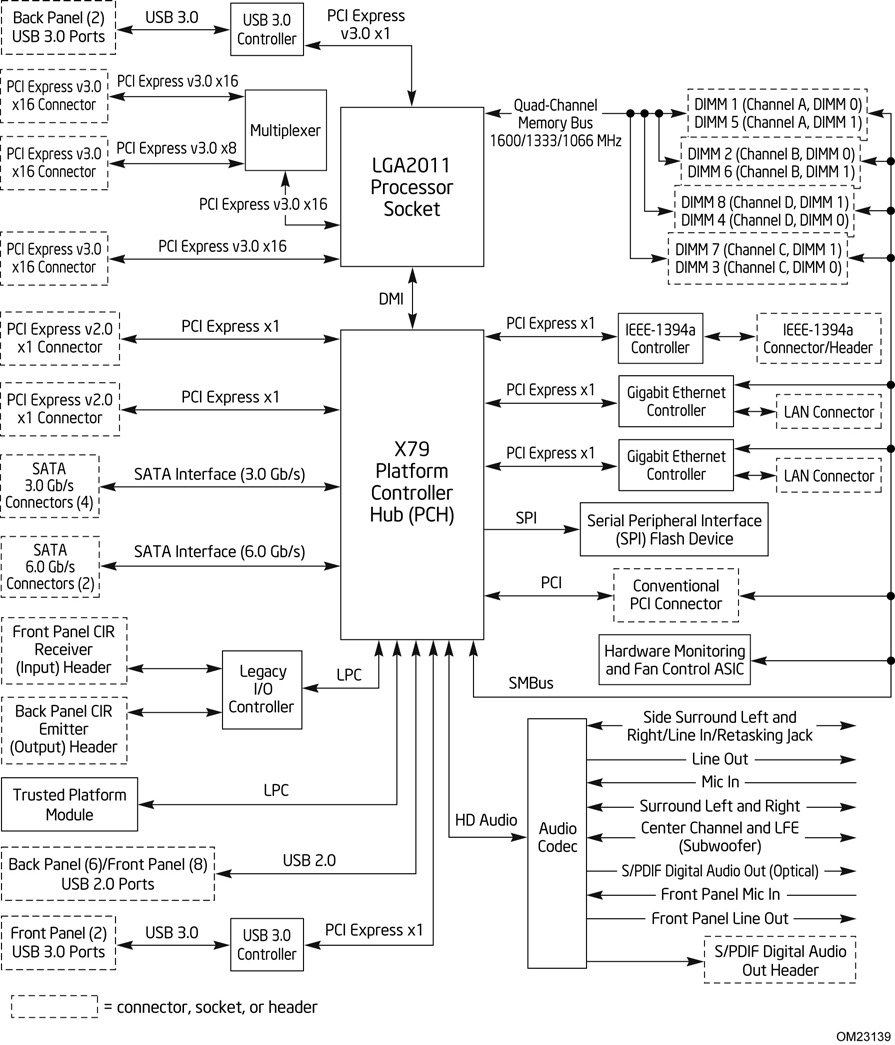
Above is a block diagram of the routing of the LGA 2011 socket and the X79 Platform Controller Hub (PCH), taken from Intel’s DX79SI motherboard information, which will be reviewed in due course. A few points are specific to that board (dual LAN controllers, USB 3.0 implementation), but it covers the basics of most X79. As we can see, the GPU PCIe lanes are split through multiplexers and switches for x16/x8 or even x4 speeds, depending on the motherboard in question. The connection via DMI from the CPU to the PCH gives the motherboard most of the functionality – PCIe x1, SATA, Legacy IO, TPM, USB 2.0, Audio, Ethernet etc. Most of these features are obviously adjustable by the motherboard manufacturer, in terms of quantity (decrease or increase through controllers), or manipulation, for example ASUS’ SSD Caching, as explained in the ASUS review later.

Intel Core i7 3960X (Sandy Bridge E) Review: Keeping the High End Alive

If you look carefully enough, you may notice that things are changing. It first became apparent shortly after the release of Nehalem. Intel bifurcated the performance desktop space by embracing a two-socket strategy, something we'd never seen from Intel and only once from AMD in the early Athlon 64 days (Socket-940 and Socket-754).
LGA-1366 came first, but by the time LGA-1156 arrived a year later it no longer made sense to recommend Intel's high-end Nehalem platform. Lynnfield was nearly as fast and the entire platform was more affordable.
When Sandy Bridge launched earlier this year, all we got was the mainstream desktop version. No one complained because it was fast enough, but we all knew an ultra high-end desktop part was in the works. A true successor to Nehalem's LGA-1366 platform for those who waited all this time.

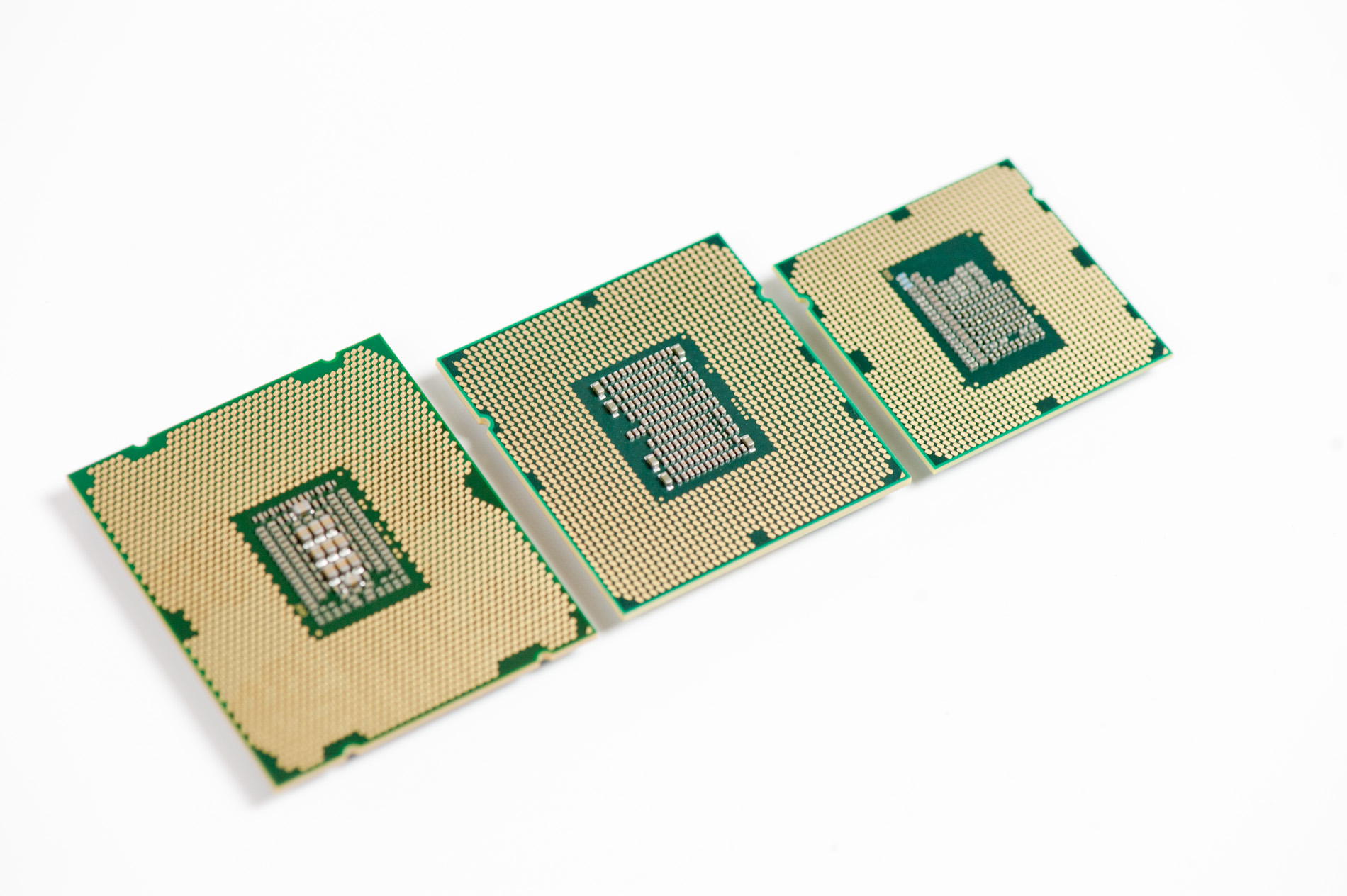
Left to right: Sandy Bridge E, Gulftown, Sandy Bridge
After some delays, Sandy Bridge E is finally here. The platform is actually pretty simple to talk about. There's a new socket: LGA-2011, a new chipset Intel's X79 and of course the Sandy Bridge E CPU itself. We'll start at the CPU.

Friday, November 11, 2011

CPU Chart, Processors Hierarchy 2011

What about this other CPU that’s not on the list? How do I know if it’s a good deal or not?
This will happen. In fact, it’s guaranteed to happen because availability and prices change quickly. So how do you know if that CPU you have your eye on is a good buy in its price range?
Here is a resource to help you judge if a CPU is a reasonable value or not: the gaming CPU hierarchy chart, which groups CPUs with similar overall gaming performance levels into tiers. The top tier contains the highest-performing gaming CPUs available and gaming performance decreases as you go down the tiers from there.
This hierarchy was originally based on the average performance each CPU achieved in our charts test suite using only four game titles: Crysis, Unreal Tournament 3, World in Conflict, and Supreme Commander. We have since incorporated new game data into our criteria, but it should be known that any specific game title will likely perform differently depending on its unique programming. Some games, for example, will be severely graphics subsystem-limited, while others may react positively to more CPU cores, larger amounts of CPU cache, or even a specific architecture. We also did not have access to every CPU on the market, so some of the CPU performance estimates are based on the numbers similar architectures deliver. Indeed, this hierarchy chart is useful as a general guideline, but certainly not as a one-size-fits-all CPU comparison resource. For that, we recommend you check out our CPU Performance Charts.
You can use this hierarchy to compare the pricing between two processors, to see which one is a better deal, and also to determine if an upgrade is worthwhile.

Thursday, November 10, 2011

Holiday Budget System Buyers' Guide: Recommended Budget Systems


Recommended Budget Systems
Note the below prices include neither taxes nor shipping as those vary based on the buyer's specific location. The RAM, hard drive, optical drive, power supply, and case recommendations are all, of course, interchangeable between the AMD and Intel-based systems, so mixing and matching those components is unproblematic.
Budget AMD Athlon II X2 system
As noted on previous pages, the AMD motherboards are largely interchangeable and the inclusion of the ASRock board in this list is largely subjective. In this case, it is my opinion that the ASRock board's richer feature set outweighs its shorter warranty.
ComponentProductPrice
CPUAMD Athlon II X2 250 (dual-core 3.0GHz)$60
MotherboardASRock 880GM-LE (HD 4250 IGP)$55
RAMGSkill 4GB DDR3-1333 kit$26
Hard driveSeagate Barracuda 7200.12 500GB$70
Optical driveLite-on iHAS124-04$18
Power supplyAntec Earthwatts 380W$40
CaseBitFenix Merc Alpha$39
Operating systemWindows 7 Home Premium 64-bit$100
 Total:$408
Budget AMD A4-3300 system
It's important to remember that the A4-3300 uses socket FM1 motherboards, so you cannot swap only the processor between these two AMD builds.

Holiday Budget System Buyers' Guide: Celeron, Athlon II, Llano


Sandy Bridge Celerons
Intel released Sandy Bridge-based Celeron CPUs in early September, and these started appearing in retail channels by the middle of that month; we provided a brief overview of these parts. The Celeron that stands out is the G530, a dual-core CPU clocked at 2.4GHz with 2MB L3 cache and on-die Intel HD Graphics. This processor lacks Hyper-Threading and Quick Sync support, and it has a TDP of 65W (though it will generally use far less power than that). While Intel's suggested pricing is a meager $42, retail prices have stayed steady since its release at $55-60. It is the least powerful Intel dual-core CPU, with only the single core G440 available for less money.
If you've been building and using computers for years, you know there is a stigma attached to the Celeron name. For a long time, Celerons were crippled to the point of near-unusability for even the most basic tasks. That has changed as our basic benchmarks indicate that the G530 is not at all an almost-garbage CPU. The Celeron stigma is dead.
Athlon II X2s
AMD's Athlon II X2 Regor-based 45nm dual-cores have been a mainstay of budget computing since their introduction in 2009. The Athlon II X2 250, clocked at 3.0GHz with 2MB L2 cache, is essentially as capable today as it was two years ago for basic usage. For example, 1080p videos on YouTube are no more difficult to decode and Microsoft Office 2010 isn't much more CPU-hungry than Office 2007 was. Given that most computers I assemble are budget systems, I've now used the Athlon II X2 250 for more builds than any other CPU. Is that about to change?
Llano APUs
AMD's most recent APUs (accelerated processing units) have also expanded into the budget processor range. These Fusion APUs combine both the CPU and Radeon "cores" on a single die. Anand reviewed the most capable APU back in June, and compared the A6 model to Intel's Sandy Bridge Pentium in late August. The more recently released 32nm A4-3300 chip (overviewed by Anand in September) is a dual-core part clocked at 2.5GHz with 1MB total L2 cache and featuring AMD's Radeon HD 6410 graphics—160 GPU cores clocked at 443MHz. Its nominal TDP is 65W. Priced around $70, the A4-3300 is only about $10 more than the Celeron G530 and Athlon II X2 250. It promises better graphics performance—but how does the least expensive A-series APU compare to inexpensive discrete video cards, and do you sacrifice processor performance for better graphics?
Battle of the Budget Processors: Benchmarks
While we didn't put the Celeron G530 and A4-3300 through our extensive Bench suite, here are a few benchmarks that show how they stack up against the venerable Athlon II X2 250. All benchmarks were performed using an Antec Neo Eco 400W power supply, a Western Digital Blue 500GB WD5000AAKX hard drive, and a 2x2GB kit of DDR3-1333 with a clean installation of Windows 7 Enterprise 64-bit, with only the manufacturer-supplied drivers installed.
Conversion of a PowerPoint Presentation to a PDF
For this benchmark, I converted a 100 slide, 25MB PowerPoint file to a PDF using Microsoft Office 2010's integrated "Save as PDF" option. As you can see, the Athlon II CPU performs this task slightly faster than the Celeron, though in reality you're only going to actually notice a difference if you're converting extremely large PowerPoint files. The Fusion APU is substantially slower—this is a difference you will notice in real-world usage scenarios.
7-Zip performance
These values were obtained using 7-Zip's built-in benchmark function with a 32MB dictionary. AMD's Athlon II CPU has a more noticeable advantage here over the Celeron—you will notice a difference if compressing/decompressing either many files or large files. The A4-3300 again performs palpably worse--no surprise given its lower 2.5GHz clock compared to the Athlon's 3.0GHz.
FastStone image resizing
For this test, I resized 50 4200p pictures down to 1080p resolution using FastStone's batch image conversion function. Again, the two CPUs perform similarly, though this time Intel takes the lead. The AMD APU once again lags significantly behind the two CPUs.
x264 HD encode test
Graysky's x264 HD test (v. 3.03) uses x264 to encode a 4Mbps 720p MPEG-2 source. The focus here is on quality rather than speed, thus the benchmark uses a 2-pass encode and reports the average frame rate in each pass. The difference between the Athlon II and Celeron CPUs is essentially nil; both offer better performance than the AMD APU.
Power consumption
Like the above benchmarks, all components were held equal for power consumption testing sans the CPU and motherboard. For the Athlon II platform, I used the ASRock 880GM-LE motherboard, for the Intel platform I used the ASRock H61M-VS motherboard, and the APU was tested on an ASRock A55M-HVS. This is where the efficiency of the newer architectures truly outshines the older Athlon II design. Measurements were taken using a P3 International P4400 Kill A Watt monitor and reflect the entire system, not just the CPU.
Intel's Celeron still leads for low power use, but Llano is at least within striking distance. The older Athlon II X2 uses around 50% more power than Llano for these two tests--or around 17 to 30W more power. Taking the lower number and going with a system that's only powered on eight hours per day, we end up with a difference of around 50kWh per year--or $4 to $15 depending on how much you pay for electricity. If you're in a market where power costs more, obviously there's a lot to be said for going with the more efficient architectures.
Gaming benchmarks
Next we test how the AMD A4-3300 APU's graphics prowess stacks up against a budget GPU. The AMD Athlon II and Intel Celeron CPUs were paired with an AMD Radeon HD 5670 512MB DDR5 discrete GPU as neither of their integrated graphics are capable of producing a tolerable gaming experience. The A4-3300 was not paired with a discrete GPU.
Left 4 Dead 2
For the Left 4 Dead 2 benchmark, we used a 1024x768 resolution with all settings at maximum (but without antialiasing). The AMD APU delivers almost 40 frames per second by itself, so no discrete graphics card is required. Subjectively, gameplay was smooth and fluid on the APU. However, bumping up the resolution to even 720p could be an issue, even with less demanding games.
DiRT 3
For the DiRT 3 benchmark, we used DirectX 11 at 1024x768 resolution, but this time graphics options were set to the low preset. Even then, the AMD APU struggled to breach the 30 frames per second threshold, and DiRT 3 clearly did not run as smoothly as Left 4 Dead 2. That said, it remained playable, and if you're tolerant of lower resolutions, it performs fine in windowed mode.
Keep in mind that we're using the bottom-rung Llano APU for these tests, and it's a pretty major cut from the A6 models--half the shader cores, but with a slightly higher clock, and only a dual-core CPU. Where the A6 and A8 can legitimately replace budget discrete GPUs, the same cannot be said for the A4 APUs. The lowest priced A6-3500 will set you back around $100, but it drops the CPU clock to 2.1GHz and only adds a third core. Meanwhile the quad-core A6-3650 will run $120 ($110 with the current promo code), but it sports a 2.6GHz clock with the HD 6530D graphics (and a higher 100W TDP). At that point, you might also be tempted to go for the A8-3850, with the full HD 6550D graphics and a 2.9GHz clock, which brings the total for the APU to $135. All of these APUs will work in the same base setup as our Llano build, but obviously the price goes up quite a bit. If you'd like added processing and graphics power, though, the quad-core parts make sense.
Summary
As you can see, the Athlon II and Celeron CPUs are very evenly matched across a range of basic productivity tests, while the Fusion APU typically lags behind, at least for office productivity and encoding tasks. That said, the A4-3300 is capable of delivering an acceptable gameplay experience for casual gamers without necessitating a discrete GPU. Additionally, Intel's newer Sandy Bridge architecture and AMD's newer Llano architecture result in dramatically lower total system power consumption at both idle and load compared to the aging AMD Regor architecture.
So which CPU should you buy for your budget build? In terms of upgradeability, socket AM3 is still viable. In the short term, Phenom II quad-cores are already inexpensive, starting at just over $100—so they will be even cheaper in another year or two. Of course, Bulldozer CPUs are compatible with many AM3+ motherboards and could be a wise upgrade in a few years as well. Intel's LGA 1155 socket is also very upgrade-friendly—the Celeron G530 is, after all, the least powerful Sandy Bridge CPU (aside from the sole single-core SKU). The Core i3-2100 will likely sell for less than $100 in another year or so (at least on the secondhand market), and more powerful Core i5 and i7s could keep today's Intel budget build alive and well for maybe as much as five more years. Like the Celeron G530, AMD's socket FM1 has nowhere to go but up from the A4-3300 APU. That said, LGA 1155 currently offers far more powerful CPUs than the high-end A8-3850.
I think in this case, given how evenly the CPUs perform (aside from power consumption), and that both offer lots of upgrade potential, the decision will come down to overall platform cost and features. The A4-3300 APU does offer an acceptable general, basic computing experience—its real strength is its ability to play less resource-intensive games without the extra cost of a discrete GPU. We cover a few budget AMD and Intel platform motherboards on the next page.

Wednesday, November 9, 2011

Gaming CPU Hierarchy Chart


What about this other CPU that’s not on the list? How do I know if it’s a good deal or not?
This will happen. In fact, it’s guaranteed to happen because availability and prices change quickly. So how do you know if that CPU you have your eye on is a good buy in its price range?
Here is a resource to help you judge if a CPU is a reasonable value or not: the gaming CPU hierarchy chart, which groups CPUs with similar overall gaming performance levels into tiers. The top tier contains the highest-performing gaming CPUs available and gaming performance decreases as you go down the tiers from there.
However, a word of caution: this hierarchy is based on the average performance each CPU achieved in our charts test suite using only four game titles: Crysis, Unreal Tournament 3, World in Conflict, and Supreme Commander. While we feel this represents an acceptable cross-section of typical gaming scenarios, a specific game title will likely perform differently. Some games, for example, will be severely graphics subsystem-limited, while others may react positively to more CPU cores, larger amounts of CPU cache, or even a specific architecture. We also did not have access to every CPU on the market, so some of the CPU performance estimates are based on the numbers similar architectures deliver. Indeed, this hierarchy chart is useful as a general guideline, but certainly not as a gospel one-size-fits-all perfect CPU comparison resource.
You can use this hierarchy to compare the pricing between two processors, to see which one is a better deal, and also to determine if an upgrade is worthwhile. I don’t recommend upgrading your CPU unless the potential replacement is at least three tiers higher. Otherwise, the upgrade is somewhat parallel and you may not notice a worthwhile difference in game performance.
Gaming CPU Hierarchy Chart
IntelAMD
Core i7-2600, -2600K
Core i7-965, -975 Extreme, -980X Extreme
Core i7-970, -960
Core i5-2500, -2500K

Core i7-860, -870, -875K, -920, -930, -940, -950,
Core i5-750, -760
Core 2 Extreme QX9775, QX9770, QX9650
Core 2 Quad Q9650
Core i3-2100
Phenom II X4 Black Edition 975
Core 2 Extreme QX6850, QX6800
Core 2 Quad Q9550, Q9450, Q9400
Core i5-650, -655K, -660, -661, -670, -680
Phenom II X6 1100T BE, 1090T BE, 1075T
Phenom II X4 Black Edition 970, 965, 955 
Core 2 Extreme QX6700
Core 2 Quad Q6700, Q9300, Q8400, Q6600, Q8300 
Core 2 Duo E8600, E8500, E8400, E7600
Core i3 -530, -540, -550
Phenom II X6 1055T
Phenom II X4 945, 940, 920, 910, 910e, 810
Phenom II X3 Black Edition 720, 740
Athlon II X4 645, 640, 635, 630
Athlon II X3 455, 450, 445, 440, 435
Core 2 Extreme X6800
Core 2 Quad Q8200
Core 2 Duo E8300, E8200, E8190, E7500, E7400, E6850, E6750
Phenom II X4 905e, 805
Phenom II X3 710, 705e
Phenom II X2 565 BE, 560 BE, 555 BE, 550 BE, 545
Phenom X4 9950
Athlon II X4 620
Athlon II X3 425
Core 2 Duo E7200, E6550, E7300, E6540, E6700
Pentium Dual-Core E5700, E6300, E6500, E6600, E6700
Pentium G9650
Phenom X4 9850, 9750, 9650, 9600
Phenom X3 8850, 8750
Athlon II X2 265, 260, 255
Athlon 64 X2 6400+
Core 2 Duo E4700, E4600, E6600, E4500, E6420
Pentium Dual-Core E5400, E5300, E5200 
Phenom X4 9500, 9550, 9450e, 9350e
Phenom X3 8650, 8600, 8550, 8450e, 8450, 8400, 8250e
Athlon II X2 240, 245, 250
Athlon X2 7850, 7750
Athlon 64 X2 6000+, 5600+
Core 2 Duo E4400, E4300, E6400, E6320
Celeron E3300
Phenom X4 9150e, 9100e
Athlon X2 7550, 7450, 5050e, 4850e/b
Athlon 64 X2 5400+, 5200+, 5000+, 4800+
Core 2 Duo E5500, E6300
Pentium Dual-Core E2220, E2200, E2210
Celeron E3200
Athlon X2 6550, 6500, 4450e/b, 
Athlon X2 4600+, 4400+, 4200+, BE-2400
Pentium Dual-Core E2180
Celeron E1600
Athlon 64 X2 4000+, 3800+
Athlon X2 4050e, BE-2300
Pentium Dual-Core E2160, E2140
Celeron E1500, E1400, E1200

Summary

There you have it folks: the best gaming CPUs for the money this month. Now all that’s left to do is to find and purchase them.
Also remember that the stores don’t follow this list. Things will change over the course of the month and you’ll probably have to adapt your buying strategy to deal with fluctuating prices. Good luck!

Saturday, November 5, 2011

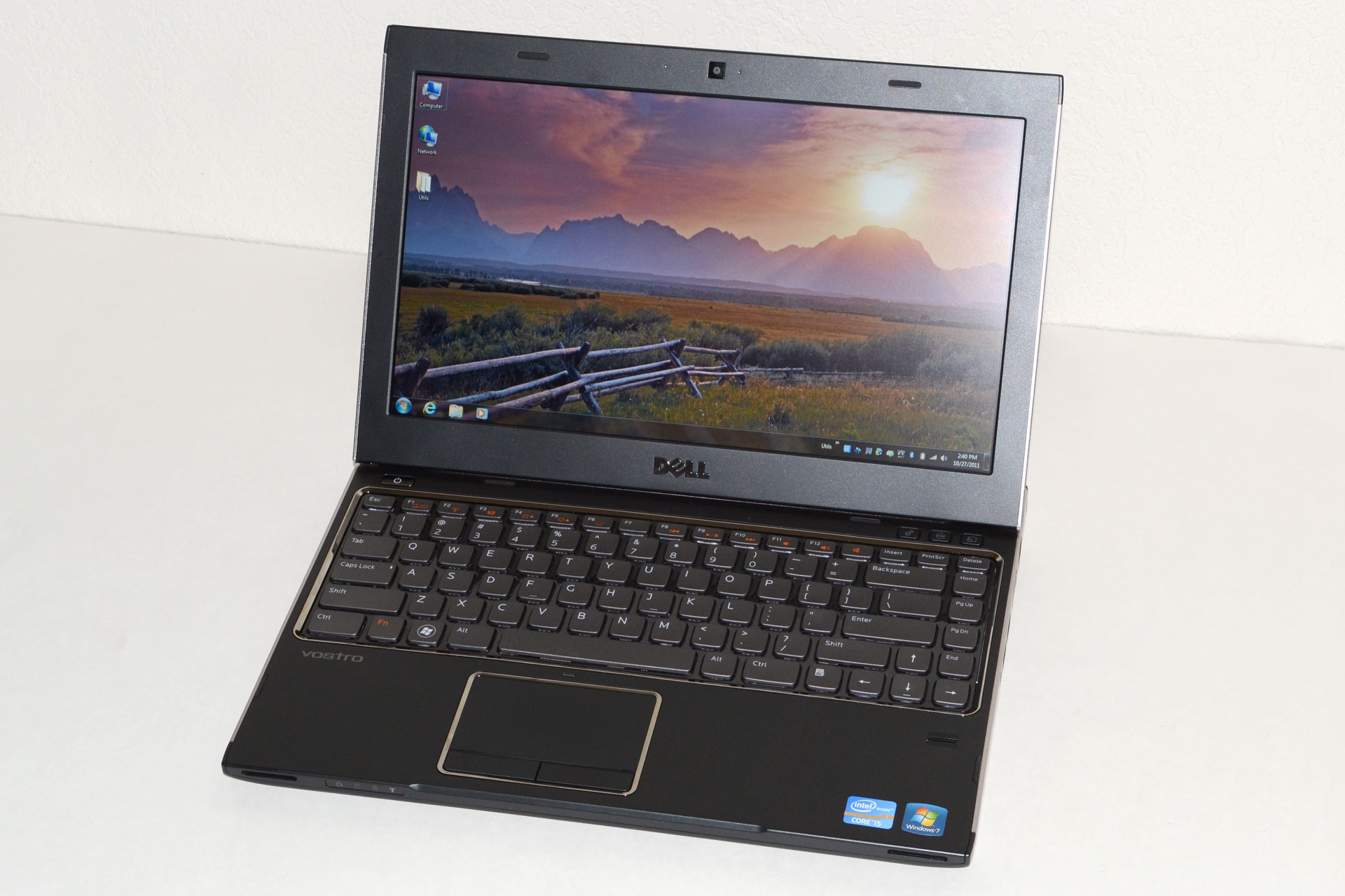
Dell Vostro V131: A Budget Business Laptop

Dell Vostro V131: What’s in a Name?
We’ve reviewed just about every line of laptops that Dell makes over the years, but we haven’t had a chance to look at the Vostro line until today. Vostro is essentially Dell’s entry-level business laptop brand, with an emphasis on business-class options while maintaining a lower price point than the Latitude line. What that means is you give up some of the performance options of Dell’s consumer lines, but you get a default 1-year warranty with next business day service along with a matte LCD. The V131 we received for review is also quite thin, nearly at ultrabook levels, which raises an interesting question: how does an $800 business laptop compare with ultrabooks and other thin-and-light laptops?
Let’s start with a brief overview of what makes something an ultrabook, as we can then easily see where the V131 falls short. We’ve covered this before, but here’s the short version: an ultrabook needs an SSD (or at least SSD caching), it needs to be “secure” (e.g. include Intel’s Identity Protection Technology), it needs to be at mainstream prices (under $1000), and it needs to be thin—really thin—0.8” thick or less to be precise. The Dell Vostro V131 already hits most of these areas, but it doesn’t have an SSD and even with the stock 4-cell battery it’s 0.83” thick. So, it’s not an ultrabook, but does that even matter?
If you put an SSD in a 4-cell V131, I’d say it’s close enough for all practical purposes. The problem is that the 6-cell extended capacity battery bumps the thickness up to 1.25”; it’s one thing to compare 0.83” with <0.8” thick, but when the comparison becomes 1.2” vs. ultrabooks there’s a noticeable increase in size. Still, I find the V131 to be “thin enough” for my purposes, particularly when we factor in the improved battery life. As for SSDs, you can’t configure the V131 with an SSD from Dell, but they’re easy enough to add on your own—and you also get to choose which particular brand/model of SSD you want rather than going with whatever Dell selects. What will be more interesting to see over the coming months is how much of a difference the ultrabook features and specs make compared to “regular” laptops like the Vostro.
Here’s the full overview of our test system features and specifications. We were shipped a higher-end configuration, and we’ve bolded the component choices where applicable in the following table. Other Vostro V131 models come with lower cost (and lower performance) CPUs, HDDs, and memory configurations.
Dell Vostro V131 Specifications
Processor Intel Celeron ULV 847 (dual-core, 1.10GHz, 2MB L3, 17W)
Intel Core i3-2310M (dual-core + HTT, 2.10GHz, 3MB L3, 35W)
Intel Core i3-2330M (dual-core + HTT, 2.20GHz, 3MB L3, 35W)
Intel Core i5-2410M (dual-core + HTT, 2.30-2.90GHz, 3MB L3, 35W)
Intel Core i5-2430M (dual-core + HTT, 2.40-3.00GHz, 3MB L3, 35W)
Chipset Intel HM67
Memory 2GB (1x2GB DDR3-1333, 1 free SO-DIMM)
4GB (2x2GB DDR3-1333)
6GB (1x4GB + 1x2GB DDR3-1333)
Graphics Intel HD Graphics (Celeron)
Intel HD 3000 Graphics
Display 13.3” WLED Matte 16:9 768p (1366x768)
(LG 133WH2)
Hard Drive(s) 320GB 7200RPM HDD
500GB 7200RPM HDD (Toshiba MK5061GSYN)
Optical Drive N/A
Networking Gigabit Ethernet(Realtek RTL8168/8111)
802.11n WiFi + Bluetooth 3.0 (Intel Wireless-N 1030)
WiDi Ready
Optional 3G/4G Mobile Broadband
Audio Stereo Speakers
Headphone jack
Battery 4-cell, 44Wh
6-cell, 11.1V, ~5.7Ah, 65Wh
Front Side N/A
Left Side Memory Card Reader
Exhaust vent
1 x USB 2.0
HDMI
Right Side Headphone Jack
2 x USB 3.0
VGA
Gigabit Ethernet
Back Side AC Power Connection
Kensington Lock
Operating System Windows 7 Professional 64-bit
Dimensions 4-Cell: 12.96" x 9.36" x 0.63-.83" (WxDxH)
(329.3mm x 237.6mm x 16.1-21.0mm)

6-Cell: 12.96" x 9.36" x 0.72-1.25" (WxDxH)
(329.3mm x 237.6mm x 18.3-31.8mm)
Weight 4.03 lbs (6-cell) / 1.83kg
Extras 1MP Webcam
86-Key backlit keyboard
Flash reader (SD, MS, MMC)
MS Office 2010 Starter
65W Power Adapter
Warranty 1-year warranty with NBD on-site service standard
Up to 3-year extended warranties available
Pricing Starting Price: $499
Reviewed Configuration: $859 (with 6GB RAM)
($659 with coupon code HCQL82SHPFRSC$)
Now that we’ve listed the specs, let’s clarify a few things. First, the 4-cell battery is quoted as an option on the spec sheet, but it doesn’t actually show up on the current four configurations. The 6-cell battery lifts the back of the laptop up about half an inch, making it quite a bit thicker. We pulled out some measuring tape and found that the front was a bit higher off the table surface than the quoted .63”, but more importantly the back is 1.25” thick with the 6-cell battery. (Measuring without the battery, the back of the laptop is 0.81” thick.) So it’s definitely thicker than an ultrabook, and the bulkier 6-cell battery really pushes it out of ultrabook contention, but otherwise the specs look pretty good on the $800 model.
The CPU offerings cover quite a wide spectrum, and your choice of CPU also influences other elements. The base model $500 V131 comes with a Celeron ULV 847 and 2GB RAM, with no option to upgrade either component (though you can still do so on your own). The Celeron 847 is a 17W part, which sounds good from a battery life perspective, but with a clock speed of 1.1GHz and only two cores it’s not going to be much faster than the old Pentium SU4100. The next bump up costs $100 more but gives you a 2.2GHz clock on the i3-2330M, plus Hyper-Threading; you also get the ability to customize the RAM and hard drive configuration.
The top-end configuration comes with an i5-2430M, 4GB RAM, and a 500GB hard drive. Our review unit is slightly out-of-date and comes with an i5-2410M, but that shouldn’t matter much, and it also has a $60 upgrade to 6GB RAM. Normally priced at $859, Dell is currently running a coupon code on the top-end model that drops the price $200. Needless to say, $659 for the i5-2430M configuration is a very reasonable price, particularly when you consider the warranty.
As a business class laptop, the Vostro line comes with next business day (NBD) on-site service standard. I’ve supported Dell systems in the past, and their NBD service worked very well. Unless something has changed, you basically call up and give them a description of the problem, and the next day someone shows up with either replacement parts (or potentially a replacement laptop). I never had issues with their local service provider, and compared to the runaround you often get with consumer support it’s hard to overstate the importance of fast service for business users. If you’re at a company that’s large enough to have an IT department, it probably doesn’t matter much, but for smaller companies minimizing downtime is critical. Bumping up to a 3-year NBP warranty is also priced at just $80; that compares to a $119 charge to do the same on an Inspiron 14z, or $299 (WTF!?) to get a 3-year warranty on the XPS 15z. (Note: all of those prices I just quoted are liable to change, sometimes by a large amount, at any given time.)
While the specs may not be enough to set the world on fire, business generally aren’t interested in the bleeding edge. Instead, they want a well-built laptop that will stand the test of time, and while the Vostro V131 may not include the spill resistant keyboard or magnesium alloy frame of a Dell Latitude, the V131 does try to strike a nice balance between features, build quality, and cost. It also looks unassuming (unless you get the red version), which is what most companies prefer. So how successful is the V131 at maintaining that balance? Let’s dig a little deeper.

Source: AnandTech.com