search for it

Showing posts with label Performance. Show all posts

Friday, June 26, 2015

Best Graphics Cards For The Money: June 2015 (VGA Chart)


What about this other card that’s not on the list? How do I know if it’s a good deal or not? This will happen. In fact, because inventory levels and prices change quickly, it’s guaranteed to happen. So how do you know if that card you’ve got your eye on is a good buy in its price range? Here is a resource to help you judge if a card is a good buy or not. The graphics card hierarchy chart groups graphics cards with similar overall performance levels into tiers. The top tier contains the highest-performing cards available, and performance decreases as you go down the tiers from there. You can use this hierarchy to compare the pricing between two cards, to see which one is a better deal, and also to determine if an upgrade is worthwhile. I don’t recommend upgrading your graphics card unless the replacement card is at least three tiers higher. 

Otherwise, the upgrade is somewhat parallel, and you may not even notice any worthwhile difference in performance. At the request of readers, we've added mobile graphics and integrated chipsets to the hierarchy chart. We want to make it clear that there is very little performance data available for these graphics solutions. While the discrete video cards in the chart are placed in tiers based on a lot of information, many of the mobile and integrated devices in the chart are guesstimates based on their specifications. 

At worst, we doubt they’re more than one tier away from their actual performance, but this is something to keep in mind when considering mobile graphics chipsets. - See more at: http://www.tomshardware.com/reviews/gaming-graphics-card-review,3107-7.html#sthash.eumLyC7g.dpuf


Graphics Card Hierarchy Chart
GeForce Radeon Intel
Discrete: GTX Titan Z Discrete: R9 295X2
Discrete: GTX 690, Titan X, 980 Ti Discrete: HD 7990
Discrete: GTX 780 Ti, 980, Titan Black
Discrete: GTX 780, 970, Titan Discrete: R9 290, 290X, 390X, 390
Discrete: GTX 590, 680, 770 Discrete:  HD 6990, 7970 GHz Ed, R9 280X, 380
Go (mobile): 980M
Discrete: GTX 580, GTX 670, GTX 960 Discrete: HD 5970, 7870 LE (XT), 7950, 280, 285
Go (mobile): 970M
Discrete: GTX 660 Ti, GTX 760 Discrete: HD 7870, R9 270, R9 270X, R7 370
Go (mobile): 880M
Discrete: GTX 295, 480, 570, 660 Discrete: HD 4870 X2, 6970, 7850, R7 265,
Go (mobile): 680M, 780M Mobility: 7970M
Discrete: GTX 470, 560 Ti, 560 Ti 448 Core, 650 Ti Boost, 750 Ti Discrete: HD 4850 X2, 5870, 6950, R7 260X
Mobility: 7950M
Discrete: GTX 560, 650 Ti, 750 Discrete: HD 5850, 6870, 7790
Go (mobile): 580M, 675M Mobility: 6990M
Discrete: 9800 GX2, 285, 460 256-bit, 465 Discrete: HD 6850, 7770, R7 260, R7 360
Mobility: 6900M
Discrete: GTX 260, 275, 280, 460 192-bit, 460 SE, 550 Ti, 560 SE, GT 650, GT 740 GDDR5 Discrete: HD 4870, 5770, 4890, 5830, 6770, 6790, 7750 (GDDR5), R7 250 (GDDR5), R7 250E Iris Pro Graphics 6200
Go (mobile): 570M, 670M Mobility: HD 5870, 6800M
Discrete: 8800 Ultra, 9800 GTX, 9800 GTX+, GTS 250, GTS 450  Discrete: HD 3870 X2, 4850, 5750, 6750, 7750 (DDR3), R7 250 (DDR3)
Go (mobile): 560M, 660M Mobility: HD 4850, 5850, 7870M
Discrete: 8800 GTX, 8800 GTS 512 MB, GT 545 (GDDR5), GT 730 64-bit GDDR5 Discrete: HD 4770
Go (mobile): GTX 280M, 285M, 555M (GDDR5) Mobility: HD 4860, 7770M, 7850M
Discrete: 8800 GT 512 MB, 9800 GT, GT 545 (DDR3), GT 640 (DDR3), GT 740 DDR3 Discrete: HD 4830, HD 5670, HD 6670 (GDDR5), HD 7730 (GDDR5)
Go (mobile): 9800M GTX, GTX 260M (112), GTS 360M (GDDR5), 555M (DDR3) Mobility: HD 5770, HD 5750, 6600M/6700M (GDDR5), 7750M
Discrete: 8800 GTS 640 MB, 9600 GT, GT 240 (GDDR5) Discrete: HD 2900 XT, HD 3870, HD 5570 (GDDR5), HD 6570 (GDDR5)
Go (mobile): 9800M GTS, GTX 160M Mobility: 6500M (GDDR5), 6600M/6700M (DDR3), 7730M
Discrete: 8800 GS, 9600 GSO, GT 240 (DDR3) Discrete: HD 3850 512 MB, HD 4670, HD 5570 (DDR3), HD 6570 (DDR3), HD 6670 (DDR3), HD 7730 (DDR3), R7 240
Go (mobile): GTX 260M (96), GTS 150M, GTS 360M (DDR3) Mobility: HD 3870, HD 5730, HD 5650, 6500M (DDR3)
Discrete: 8800 GT 256 MB, 8800 GTS 320 MB, GT 440 GDDR5, GT 630 GDDR5, GT 730 128-bit GDDR5 Discrete: HD 2900 PRO, HD 3850 256 MB, 5550 (GDDR5)
Go (mobile): 8800M Mobility: HD 3850
Discrete: 7950 GX2, GT 440 DDR3, GT 630 DDR3, GT 730 128-bit DDR3 Discrete: X1950 XTX, HD 4650 (DDR3), 5550 (DDR3)
Integrated: HD 7660D
Discrete: 7800 GTX 512, 7900 GTO, 7900 GTX, GT 430, GT 530 Discrete: X1900 XT, X1950 XT, X1900 XTX 
Go (mobile): 550M
Discrete: 7800 GTX, 7900 GT, 7950 G, GT 220 (DDR3) Discrete: X1800 XT, X1900 AIW, X1900 GT, X1950 Pro, HD 2900 GT, HD 5550 (DDR2)
Go (mobile): 525M, 540M Integrated: HD 7560D
Discrete: 7800 GT, 7900 GS, 8600 GTS, 9500 GT (GDDR3), GT 220 (DDR2) Discrete: X1800 XL, X1950 GT, HD 4650 (DDR2), HD 6450, R5 230
Go (mobile): 7950 GTX Mobility: X1800 XT, HD 4650, HD 5165, 6400M
Integrated: HD 6620G, 6550D, 7540D
Discrete: 6800 Ultra, 7600 GT, 7800 GS, 8600 GS, 8600 GT (GDDR3), 9500 GT (DDR2)  Discrete: X800 XT (& PE), X850 XT (& PE), X1650 XT, X1800 GTO, HD 2600 XT, HD 3650 (DDR3), HD 3670 Integrated: Intel HD Graphics 4000
Go (mobile): 7800 GTX, 7900 GTX Mobility: X1900, 3670 
Integrated: 6520G, 6530D, 7480D
Discrete: 6800 GT, 6800 GS (PCIe), 8600 GT (DDR2), GT 520 Discrete: X800 XL, X800 GTO2/GTO16, HD 2600 Pro, HD 3650 (DDR2), 
Go (mobile): 7800, Go 7900 GS, 520M, 520MX Mobility: X800 XT, HD 2600 XT, 3650 
Integrated: 6410D, 6480G
Discrete: 6800 GS (AGP) Discrete: X800 GTO 256 MB, X800 PRO, X850 Pro, X1650 GT
Go (mobile): 6800 Ultra, 7600 GT, 8600M GT, 8700M GT, 410M Mobility: HD 2600 
Integrated: 6370D, 6380G
Discrete: 6800, 7300 GT GDDR3, 7600 GS, 8600M GS  Discrete: X800, X800 GTO 128 MB, X1600 XT, X1650 Pro
Go (mobile): 6800, 7700 Mobility: X1800, HD 5145, HD 5470 (GDDR5)
Discrete: 6600 GT, 6800LE, 6800 XT, 7300 GT (DDR2), 8500 GT, 9400 GT  Discrete: 9800 XT, X700 PRO, X800 GT, X800 SE, X1300 XT, X1600 PRO, HD 2400 XT, HD 4350, HD 4550, HD 5450 Integrated: Intel HD Graphics 3000
Go (mobile): 7600 (128-bit) Mobility: X800, 3470, HD 5470 (DDR3), HD 5450, HD 5430, 6300M
Integrated: HD 6310, HD 6320
Discrete: FX 5900, FX 5900 Ultra, FX 5950 Ultra, 6600 (128-bit) Discrete: 9700, 9700 Pro, 9800, 9800 Pro, X700, X1300 Pro, X1550, HD 2400 Pro
Go (mobile): 6800 (128-bit) Mobility: X1450, X1600, X1700, 2400 XT, X2500, 3450
Integrated: 9300, 9400 Integrated: HD 3200, HD 3300, HD 4200, HD 4250, HD 4290, HD 6250, HD 6290 
Discrete: FX 5800 Ultra, FX 5900 XT Discrete: 9500 Pro, 9600 XT, 9800 Pro (128-bit), X600 XT, X1050 (128-bit) Integrated: Intel HD Graphics (Core i5-6x1), 2000
Go (mobile): 6600, Go 7600 (64-bit) Mobility: 9800, X700, X1350, X1400, X2300, HD 2400
Discrete: 4 Ti 4600, 4 Ti 4800, FX 5700 Ultra, 6200, 8300, 8400 G, G 210, G 310 Discrete: 9600 PRO, 9800 LE, X600 PRO, HD 2300 Integrated: Intel HD Graphics (Core i3 5x0, Core i5-6x0)
Go (mobile): 315M Mobility: 9700 (128-bit), X600, X1300
Integrated: Xpress 1250
Discrete: 4 Ti4200, 4 Ti4400, 4 Ti4800 SE, FX 5600 Ultra, FX 5700, 6600 (64-bit), 7300 GS, 8400M GS, 9300M G, 9300M GS Discrete: 9500, 9550, 9600, X300, X1050 (64-bit)  Integrated: Intel HD Graphics (Pentium G)
Mobility: 9600
Discrete: 3 Ti500, FX 5200 Ultra, FX 5600, FX 5700 LE, 6200 TC, 6600 LE, 7200 GS, 7300 LE Discrete: 8500, 9100, 9000 PRO, 9600 LE, X300 SE, X1150 Integrated: GMA X4500
Go (mobile): 5700, 8200M, 9200M GS, 9100 Mobility 9700 (64-bit)
Integrated: 8200, 8300
Discrete: 3, 3 Ti200, FX 5200 (128-bit), FX 5500,  Discrete: 9000, 9200, 9250
Go (mobile): 5600, 6200, 6400, 7200, 7300, 7400 (64-bit) Mobility: 9600 (64-bit), X300
Discrete: FX 5200 (64 bit) Discrete: 9200 SE Integrated: GMA X3000, X3100, X3500
Go (mobile): 7200, 7400 (32-bit) Integrated: Xpress 200M, Xpress 1000, Xpress 1150
Integrated: 6100, 6150, 7025, 7050
Discrete: 2 GTS, 4 MX 440, 2 Ultra, 2 Ti, 2 Ti 200 Discrete: 7500 Integrated: GMA 3000, 3100
Discrete: 256, 2 MX 200, 4 MX 420, 2 MX 400 Discrete: SDR, LE, DDR, 7000, 7200 Integrated: GMA 500, 900, 950
Discrete: Nvidia TNT Discrete: Rage 128 Discrete: Intel 740


Now all that’s left to do is compare performance to your budget, and you'll be able to confidently decide which board is right for you - we even put in the legwork to help find you the best prices! - See more at: http://www.tomshardware.com/reviews/gaming-graphics-card-review,3107-7.html#sthash.eumLyC7g.dpuf

Source: Tom's Hardware

Monday, November 21, 2011

Toshiba DX735 All-in-One: Notebooks Without Batteries

Introducing the Toshiba DX735 All-in-One
So far we've tested HP's TouchSmart 610 all-in-one and Dell's Inspiron One all-in-one, and in both cases we've found things to like along with aspects that left us wanting. Today we have on hand Toshiba's DX735 in its least expensive configuration. Starting at under a grand, the DX735 at least superficially suggests a design that's more focused, more streamlined, and less schizophrenic than the competition. Did Toshiba do right where the others stumbled, or is the DX735 just another case of too many compromises?
A Toshiba computer meant to be used solely on the desktop seems like a rare thing, but once you take a look at the specifications you'll see they went in a completely different direction from HP and Dell. While HP and Dell paired desktop processors with underpowered discrete notebook graphics, Toshiba cut a lot of the fat and just went for pure notebook hardware (excepting the hard drive). Here's what we received for review.

ECS EliteGroup X79R-AX Motherboard Review

The Intel X79 Express Chipset is finally here and every competitor is releasing motherboards exclusively for it. ECS EliteGroup is just one of the major competitors we will be looking at today. They have released their X79R-AX motherboard and it is coming to the market as an entry level motherboard. It comes with great features and a smaller price tag so you can enjoy the new chipset without breaking your wallet.
Since this is a motherboard specifically designed for the new Intel X79 Express Chipset, let’s go over some of the features of this new chipset. First off, it supports the 2nd Gen Intel core i7 and the Intel Core Family Processors in the LGA 2011 Sandy Bridge-E Processors. It is also designed to connect to a DMI interface to peripheral devices. This allows a direct interface between the Intel northbridge and southbridge. What will disappoint some enthusiasts is that their new line of X79 motherboards will not include Intel’s Smart Response Technology.

Other main improvements with this new chipset includes Performance Overclocking, PCIe based Uplink to processor, Up to 8PCIe lanes from PCH, and up to 14 SATA connections (10 ports at 6 Gb/s and/or 8 ports supporting SATA and SAS). Intel has also included Quad Channel DDR3 memory and an overclock memory speed of up to 2666MHz. However, don’t get hyped up on the Quad Channel because in reality it’s just 4 Dual Channel memory sticks. With the addition of these new motherboards will be seeing a lot more SATA ports not only because of the increased allowable connections but also Intel’s Rapid Storage Technology. All these features allow users to easily overclock their motherboards and get higher efficiencies as well. Also, having extra SATA 6Gb/s ports never hurt anyone and it will definitely make use all of the fast transfer speeds of SSDs in the market.

Thursday, November 17, 2011

Apple 15-inch MacBook Pro (Late 2011) Review

The early 2011 MacBook Pro is honestly Apple's best effort to date. Only using quad-core CPUs on the 15 and 17-inch models, and offering an optional Thunderbolt Display that can act as a modern day dock makes this platform, particularly the 15-inch model, the perfect candidate for users who want the power and flexibility of a desktop with the portability of a notebook. Apple gets the mobile revolution in more ways than one, and its MacBook Pro/Thunderbolt Display combo is the perfect example of that.
It's this very combination that I've been using, partially since the introduction of the Sandy Bridge MacBook Pro earlier this year (the Thunderbolt Display didn't arrive until later). I've been quite happy with the setup. With the exception of lackluster Quick Sync adoption by Apple and obviously limited GPU options, I have very few major complaints.
Late last month, Apple updated its 2011 MacBook Pro lineup - likely the first and last update before Apple adopts Ivy Bridge in Q2 next year. We got our hands on the new base 15-inch MacBook Pro configuration, which received one of the more substantial upgrades over the previous model. As this is still a fairly minor upgrade, be sure to read our original review of the platform for a deeper drive into all of the aspects of the system.

Sandy Bridge-E: Core i7-3960X Is Fast, But Is It Any More Efficient?

Ironically, when it comes to performance, Intel’s Core i7-3960X is the real Bulldozer. Since its power consumption levels are lower than the Gulftown-based Core i7, it should also deliver amazing performance per watt as well. Is that really the case?
Intel's Sandy Bridge-E design takes the company's 32 nm Sandy Bridge architecture to the next level. As you likely saw in Chris Angelini’s full review on Sandy Bridge-E And X79 Express, the new high-end processor family offers more of almost everything: more cores, more cache, more memory channels, and more PCI Express connectivity, resulting in better benchmark scores in almost every discipline.
While the new processor design, which is now available as the Core i7-3960X and Core i7-3930K (and Core i7-3820 some time next year) delivers more performance, we've already seen the first review machines based on X79 Express lowering power consumption versus the Gulftown/X58 combination thanks to the dual-chip platform layout. AMD might not want to learn in detail what this could mean in terms of performance per watt, since the six-core Core i7-990X was already faster than its flagship FX-8150.

Corsair Announces Full Line of Quad Channel DRAM Kits

Corsair has announced a full line of quad-channel memory kits designed for the LGA 2011 socket to go along with its original 32GB set announced in October.
The Dominator and Vengeance kits utilize Intel's Extreme Memory Profile (XMP) 1.3 for easy performance tuning. The Dominator utilizes its standard DHX+ heatsink, while the Vengeance uses an aluminum heat spreader. The Dominator is available in frequencies from 1600 MHz to 2400 MHz, with capacities of 8 GB (2 GB x4), 16GB (4 GB x4), and 32 GB (8 GB x4). The Vengeance is available in frequencies of 1600 MHz and 1866 MHz, with capacities of 8 GB (2 GB x4), 16 GB (4 GB x4), and 32 GB (8 GB x4). The Dominator and Vengeance units are rated and tested at voltage of 1.5V, with two Vengeance kits tested down to 1.35V.
Corsair Dominator:
ZoomZoom
Size Speed# of DIMMsPart Number
32 GB1866 MHz, 9-10-9-27, 1.5V4CMT32GX3M4X1866C9
32 GB1600 MHz, 10-10-10-27, 1.5V4CMP32GX3M4X1600C10
16 GB2133 MHz, 9-11-10-27, 1.5V4CMT16GX3M4X2133C9
16 GB1866 MHz, 9-10-9-27, 1.5V4CMP16GX3M4X1866C9
  
Corsair Vengeance:
ZoomZoomZoom
Size Speed# of DIMMsHeat SpreadersPart Number
32 GB1866 MHz, 10-11-10-30, 1.5V4Jet BlackCMZ32GX3M4X1866C10
32 GB1600 MHz, 10-10-10-27, 1.5V4Jet BlackCMZ32GX3M4X1600C10
16 GB1600 MHz, 9-9-9-24, 1.35V4Military GreenCMZ16GX3M4X1600C9G
16 GB1600 MHz, 9-9-9-24, 1.5V4Jet BlackCMZ16GX3M4X1600C9
16 GB1600 MHz, 8-8-8-24, 1.5V4Low-Profile Jet BlackCML16GX3M4X1600C8
8 GB1600 MHz,  9-9-9-24, 1.5V4Jet BlackCMZ8GX3M4X1600C9
8 GB1600 MHz, 9-9-9-24, 1.35V4Military GreenCMZ8GX3M4X1600C9G
8 GB1600 MHz, 8-8-8-24, 1.5V4Racing RedCMZ8GX3M4X1600C8R
    
"Corsair is proud to support the new 2nd Generation Intel Core i7 processor family for Socket LGA-2011 with a broad range of extreme-performance and high-performance quad channel memory kits," said Thi La, Vice President of Memory Products at Corsair. "These kits are ideal for PC performance enthusiasts, whether they're competitive overclockers, gamers, workstation builders, or they simply want the ability to equip their new system with up to 32GB of reliable, high-performance memory."
For more information on the Corsair Dominator, please visit its product page. To learn more about the Corsair Vengeance, hit its product page.

Source: Tom's Hardware
Adding Vellamo to our Mobile Benchmark Suite - Six Android Phones Tested


  1. For a while now we've been keeping track of mobile browser performance using two relatively popular JavaScript heavy benchmarks that are a regular fixation in our smartphone reviews. If you've read any of those reviews, you should immediately be able to name them - SunSpider and RightWare's BrowserMark. Tracking JavaScript performance thus far has helped us codify and track SoC performance, but really understanding and quantifying overall browsing smoothness has remained a somewhat more daunting task. Moreover, JavaScript performance is just one facet of many that contribute to the user's perception of browsing speed.
Real web browsing performance is a unique combination of system performance, the Android browser itself, and what contributions or customizations (if any) the OEM has made in the shipping browser build. This is to say nothing of the numerous third party browsers out there. Qualcomm's Innovation Center recently made public a tool for gauging overall browser performance that it has used for a while to checkpoint and gauge performance in house and in collaboration with OEMs. We've used a subtest or two from it in a few reviews already, and it's named Vellamo.

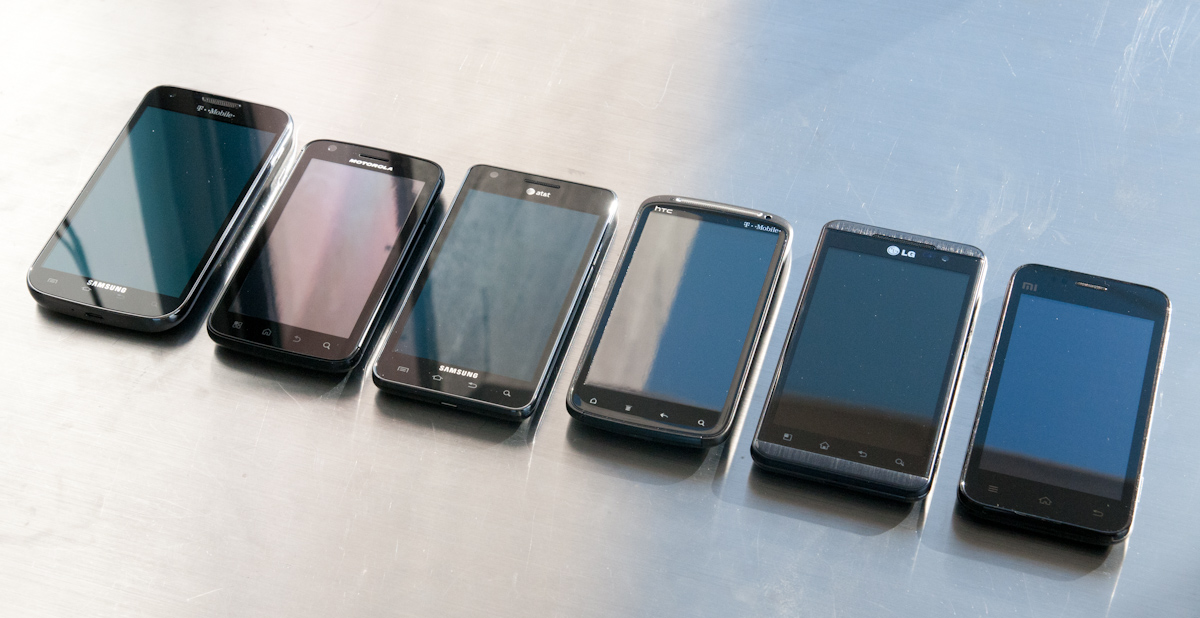
Left to right: T-Mobile SGS2, Motorola Atrix, AT&T SGS2, HTC Sensation, LG Optimus 3D, Xiaomi Mi-One
First off, Qualcomm sent us five dual-core smartphones, almost all of which we've seen and tested before. Just to be sure, we verified that nothing has been tampered with and that all were running the latest shipping OEM ROM and started fresh with a complete reset. We also added another, the T-Mobile SGS2 bringing that total to six devices.

Tuesday, November 15, 2011

G.Skill Launches RipjawsZ Quad-Channel Memory Kits

With the release of Intel's X79 platform, G.Skill has released fourteen DDR3 quad-channel memory kits designed specifically for the LGA 2011 socket.
The new G.Skill memory kits utilize the latest Intel XMP 1.3 standard developed for the X79 platform on its DDR3 1866Mhz and up kits. XMP 1.3 is designed to provide PC enthusiasts a "trouble free overclocking experience" to boost their X79 systems to "extreme" levels of performance, while maintaining system stability. G.Skill claims it has the fastest quad-ccannel memory kits with its 64 GB kit @ DDR3 2133 MHz 64 GB (8 GB x8) 1.50V XMP 1.3, 32 GB kit @ DDR3 2400 MHz 32 GB (8 GB x4) 1.65V XMP 1.3, and 16 GB kit @ DDR3 2500 MHz 16 GB(4 GB x4) 1.65V XMP 1.3.
ZoomZoom
The quad-channel kits are available in a wide range of frequencies, timings and capacities. Users can pick up kits from DDR3 1333 MHz to DDR3 2500 MHz, with timings ranging from CL 8-8-8-24 to CL 11-11-11-30. Capacities are available from 8 GB (2 GB x4), 16 GB (4 GB x4), 32 GB (4 GB x8 or 8 GB x4), or 64 GB (8 GB x8). All the kits come in G.Skill's standard black or red colors, with voltage requirements at 1.65V or below.
Zoom
All G.Skill memory products come with a lifetime warranty.

Source: Tom's Hardware

Monday, November 14, 2011

NVIDIA’s Maximus Technology: Quadro + Tesla, Launching Today

NVIDIA’s Maximus Technology – Quadro + Tesla, Launching Today
Back at SIGGRAPH 2011 NVIDIA announced Project Maximus, an interesting technology initiative to allow customers to combine Tesla and Quadro products together in a single workstation and to use their respective strengths. At the time NVIDIA didn’t have a launch date to announce, but as this is a software technology rather than a hardware product, the assumption has always been that it would be a quick turnaround. And a quick turnaround it has been: just over 3 months later NVIDIA is officially launching Project Maximus as NVIDIA Maximus Technology.
So what is Maximus Technology? As NVIDIA likes to reiterate to their customers it’s not a new product, it’s a new technology – a new way to use NVIDIA’s existing Quadro and Tesla products together. There’s no new hardware involved, just new features in NVIDIAs drivers and new hooks exposed to application developers. Or put more succinctly, in the same vein that Optimus was a driver technology to allow the transparent combination of NVIDIA mobile GPUs with Intel IGPs, Maximus is a driver technology to allow the transparent combination of NVIDIA’s Quadro and Tesla products.

Sandy Bridge-E and X79 – The ASUS P9X79 PRO Review

It seems that every few months or so, we get a new socket and a slew of new chipsets from Intel. If we go back as far as 775 (mainstream), in consumer land, we have covered 1366 (enthusiast), 1156 (mainstream) and 1155 (mainstream). This is in contrast to AMD’s backwards compatibility progression of AM2/AM2+ to AM3/AM3+ (if you ignore Llano and Fusion).
Information has been flying around about the new X79 enthusiast platform for some months now, especially when looking for a replacement for X58. Needless to say, X79 aims at high end and high price. There are the main changes that everyone knows and cares about – quad channel memory and 40 PCIe lanes strike high on anyone’s list about X79. Does that mean the chipset is really for those who want >16 GB of memory, or 2/3 way GPU action?

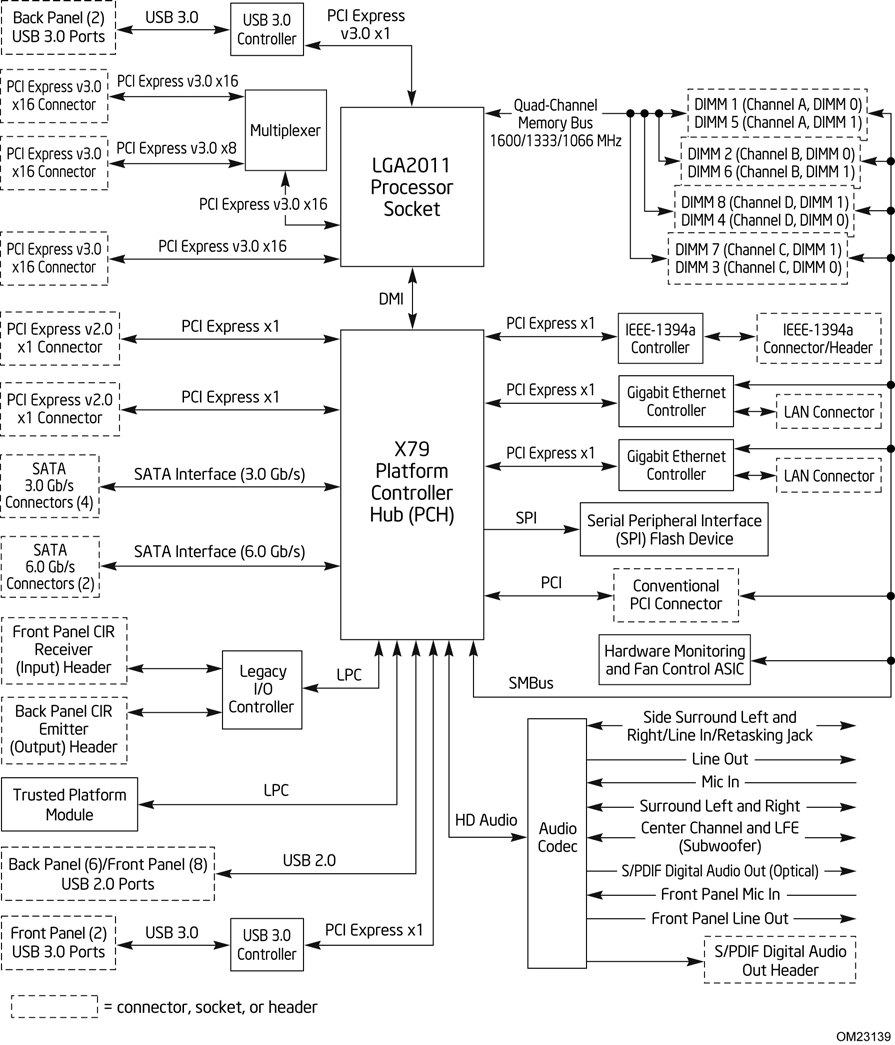
Above is a block diagram of the routing of the LGA 2011 socket and the X79 Platform Controller Hub (PCH), taken from Intel’s DX79SI motherboard information, which will be reviewed in due course. A few points are specific to that board (dual LAN controllers, USB 3.0 implementation), but it covers the basics of most X79. As we can see, the GPU PCIe lanes are split through multiplexers and switches for x16/x8 or even x4 speeds, depending on the motherboard in question. The connection via DMI from the CPU to the PCH gives the motherboard most of the functionality – PCIe x1, SATA, Legacy IO, TPM, USB 2.0, Audio, Ethernet etc. Most of these features are obviously adjustable by the motherboard manufacturer, in terms of quantity (decrease or increase through controllers), or manipulation, for example ASUS’ SSD Caching, as explained in the ASUS review later.

Intel Core i7 3960X (Sandy Bridge E) Review: Keeping the High End Alive

If you look carefully enough, you may notice that things are changing. It first became apparent shortly after the release of Nehalem. Intel bifurcated the performance desktop space by embracing a two-socket strategy, something we'd never seen from Intel and only once from AMD in the early Athlon 64 days (Socket-940 and Socket-754).
LGA-1366 came first, but by the time LGA-1156 arrived a year later it no longer made sense to recommend Intel's high-end Nehalem platform. Lynnfield was nearly as fast and the entire platform was more affordable.
When Sandy Bridge launched earlier this year, all we got was the mainstream desktop version. No one complained because it was fast enough, but we all knew an ultra high-end desktop part was in the works. A true successor to Nehalem's LGA-1366 platform for those who waited all this time.

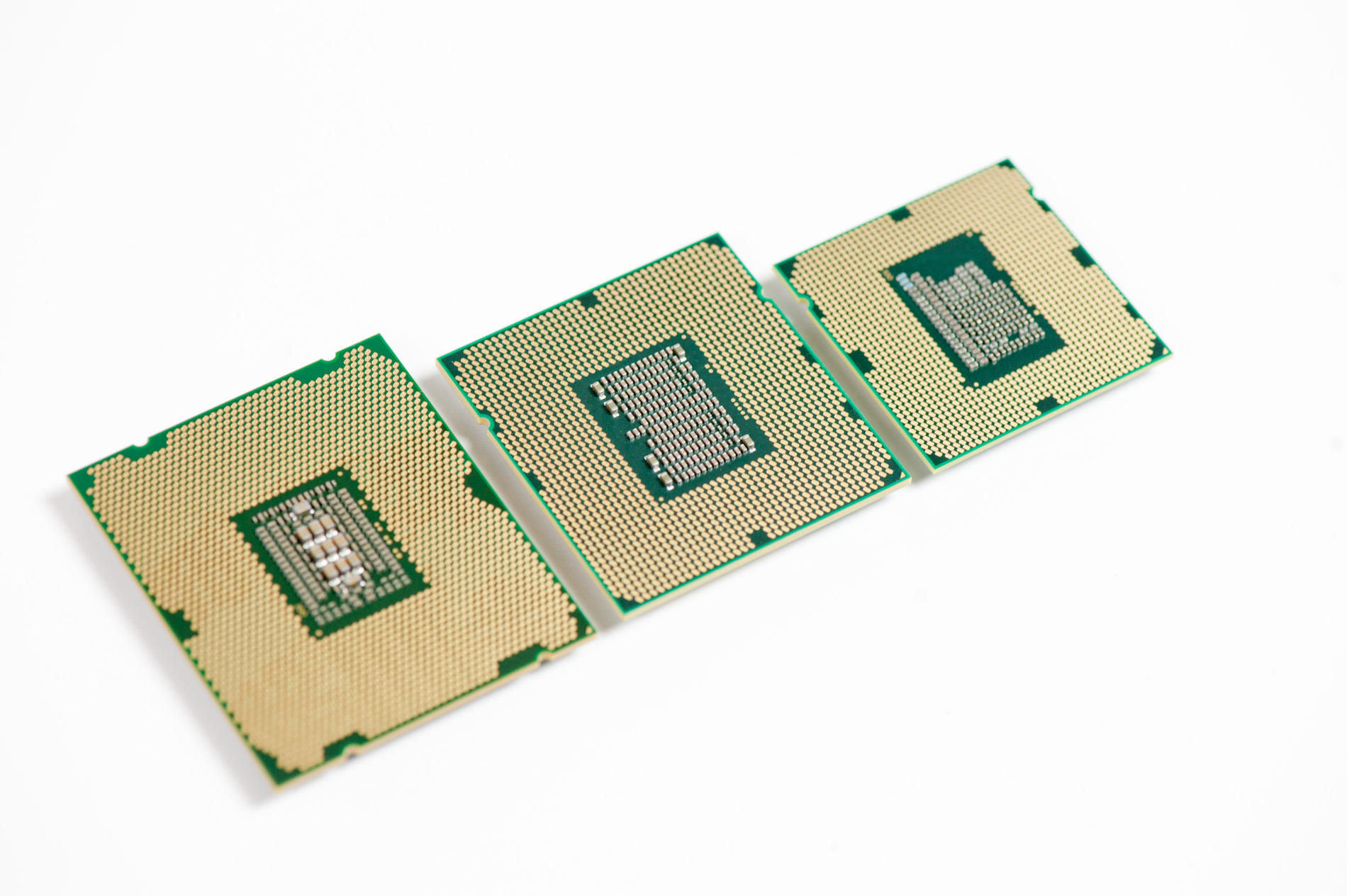
Left to right: Sandy Bridge E, Gulftown, Sandy Bridge
After some delays, Sandy Bridge E is finally here. The platform is actually pretty simple to talk about. There's a new socket: LGA-2011, a new chipset Intel's X79 and of course the Sandy Bridge E CPU itself. We'll start at the CPU.

Friday, November 11, 2011

CPU Chart, Processors Hierarchy 2011

What about this other CPU that’s not on the list? How do I know if it’s a good deal or not?
This will happen. In fact, it’s guaranteed to happen because availability and prices change quickly. So how do you know if that CPU you have your eye on is a good buy in its price range?
Here is a resource to help you judge if a CPU is a reasonable value or not: the gaming CPU hierarchy chart, which groups CPUs with similar overall gaming performance levels into tiers. The top tier contains the highest-performing gaming CPUs available and gaming performance decreases as you go down the tiers from there.
This hierarchy was originally based on the average performance each CPU achieved in our charts test suite using only four game titles: Crysis, Unreal Tournament 3, World in Conflict, and Supreme Commander. We have since incorporated new game data into our criteria, but it should be known that any specific game title will likely perform differently depending on its unique programming. Some games, for example, will be severely graphics subsystem-limited, while others may react positively to more CPU cores, larger amounts of CPU cache, or even a specific architecture. We also did not have access to every CPU on the market, so some of the CPU performance estimates are based on the numbers similar architectures deliver. Indeed, this hierarchy chart is useful as a general guideline, but certainly not as a one-size-fits-all CPU comparison resource. For that, we recommend you check out our CPU Performance Charts.
You can use this hierarchy to compare the pricing between two processors, to see which one is a better deal, and also to determine if an upgrade is worthwhile.

Thursday, November 10, 2011

Best VGA Card: $400 And Up


Best PCIe Card For ~$480:

GeForce GTX 580 (Check Prices)

Great 2560x1600 performance
GeForce GTX 580
Codename:GF110
Process:40 nm
Universal Shaders:512
Texture Units:64
ROPs:48
Memory Bus:384-bit
Core/Shader Speed MHz:772 / 1544
Memory Speed MHz:1002 (4008 effective)
DirectX/Shader Model:DX 11/SM 5.0
Max TDP:244 W
The fastest graphics card with a single GPU, Nvidia's GeForce GTX 580 challenges AMD's former flagship,