What about this other CPU that’s not on the list? How do I know if it’s a good deal or not?
This will happen. In fact, it’s guaranteed to happen because availability and prices change quickly. So how do you know if that CPU you have your eye on is a good buy in its price range?
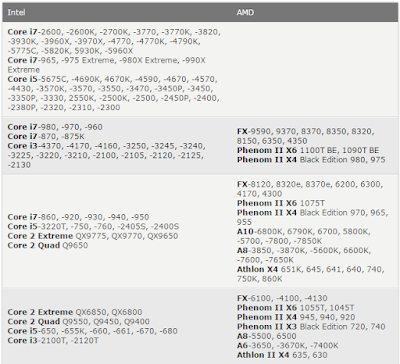
Here is a resource to help you judge if a CPU is a reasonable value or not: the gaming CPU hierarchy chart, which groups CPUs with similar overall gaming performance levels into tiers. The top tier contains the highest-performing gaming CPUs available and gaming performance decreases as you go down the tiers from there.
This hierarchy was originally based on the average performance each CPU achieved in our test suite. We have since incorporated new game data into our criteria, but it should be known that any specific game title will likely perform differently depending on its unique programming. Some games, for example, will be severely graphics subsystem-limited, while others may react positively to more CPU cores, larger amounts of CPU cache, or even a specific architecture. We also did not have access to every CPU on the market, so some of the CPU performance estimates are based on the numbers similar architectures deliver. Indeed, this hierarchy chart is useful as a general guideline, but certainly not as a one-size-fits-all CPU comparison resource. For that, we recommend you check out our CPU Performance Charts.
- See more at: http://www.tomshardware.com/reviews/gaming-cpu-review-overclock,3106-5.html#sthash.69bkXp0H.dpuf
You can use this hierarchy to compare the pricing between two processors, to see which one is a better deal, and also to determine if an upgrade is worthwhile. I don’t recommend upgrading your CPU unless the potential replacement is at least three tiers higher. Otherwise, the upgrade is somewhat parallel and you may not notice a worthwhile difference in game performance. - See more at: http://www.tomshardware.com/reviews/gaming-cpu-review-overclock,3106-5.html#sthash.69bkXp0H.dpuf


Summary
There you have it folks: the best gaming CPUs for the money this month. Now all that’s left to do is compare their performance to your budget before you decide which one is right for you. We even put in the work to help find the best prices.
Also remember that the stores don’t follow this list. Things will change over the course of the month and you’ll probably have to adapt your buying strategy to deal with fluctuating prices. Good luck!
- See more at: http://www.tomshardware.com/reviews/gaming-cpu-review-overclock,3106-5.html#sthash.69bkXp0H.dpuf
Source: Tom's Hardware
List CPUs: Core i7-2600, -2600K, -2700K, -3770, -3770K, -3820, -3930K, -3960X, -3970X, -4770, -4770K, -4790K, -5775C, -5820K, 5930K, -5960X, Core i7-965, -975 Extreme, -980X Extreme, -990X Extreme, Core i5-5675C, -4690K, 4670K, -4590, -4670, -4570, -4430, -3570K, -3570, -3550, -3470, -3450P, -3450, -3350P, -3330, 2550K, -2500K, -2500, -2450P, -2400, -2380P, -2320, -2310, -2300, Core i7-980, -970, -960, Core i7-870, -875K, Core i3-4370, -4170, -4160, -3250, -3245, -3240, -3225, -3220, -3210, -2100, -2105, -2120, -2125, -2130 FX-9590, 9370, 8370, 8350, 8320, 8150, 6350, 4350, Phenom II X6 1100T BE, 1090T BE, Phenom II X4 Black Edition 980, 975, Core i7-860, -920, -930, -940, -950, Core i5-3220T, -750, -760, -2405S, -2400S, Core 2 Extreme QX9775, QX9770, QX9650, Core 2 Quad Q9650, FX-8120, 8320e, 8370e, 6200, 6300, 4170, 4300, Phenom II X6 1075T, Phenom II X4 Black Edition 970, 965, 955 , A10-6800K, 6790K, 6700, 5800K, -5700, -7800, -7850K, A8-3850, -3870K, -5600K, 6600K, -7600, -7650K, Athlon X4 651K, 645, 641, 640, 740, 750K, 860K, Core 2 Extreme QX6850, QX6800, Core 2 Quad Q9550, Q9450, Q9400, Core i5-650, -655K, -660, -661, -670, -680, Core i3-2100T, -2120T, FX-6100, -4100, -4130, Phenom II X6 1055T, 1045T, Phenom II X4 945, 940, 920, Phenom II X3 Black Edition 720, 740, A8-5500, 6500, A6-3650, -3670K, -7400K, Athlon II X4 635, 630, Core 2 Extreme QX6700, Core 2 Quad Q6700, Q9300, Q8400, Q6600, Q8300, Core 2 Duo E8600, E8500, E8400, E7600, Core i3 -530, -540, -550, Pentium G3460, G3260, G3258, G3250, G3220, G3420, G3430, G2130, G2120, G2020, G2010, G870, G860, G850, G840, G645, G640, G630,Phenom II X4 910, 910e, 810, Athlon II X4 620, 631, Athlon II X3 460, Core 2 Extreme X6800, Core 2 Quad Q8200, Core 2 Duo E8300, E8200, E8190, E7500, E7400, E6850, E6750, Pentium G620, Celeron G1630, G1620, G1610, G555, G550, G540, G530, Phenom II X4 905e, 805, Phenom II X3 710, 705e, Phenom II X2 565 BE, 560 BE, 555 BE, 550 BE, 545, Phenom X4 9950, Athlon II X3 455, 450, 445, 440, 435, 425, Core 2 Duo E7200, E6550, E7300, E6540, E6700, Pentium Dual-Core E5700, E5800, E6300, E6500, E6600, E6700, Pentium G9650, Phenom X4 9850, 9750, 9650, 9600, Phenom X3 8850, 8750, Athlon II X2 265, 260, 255, 370K, A6-5500K, A4-6400K, 6300, 5400K, 5300, 4400, 4000, 3400, 3300, Athlon 64 X2 6400+, Core 2 Duo E4700, E4600, E6600, E4500, E6420, Pentium Dual-Core E5400, E5300, E5200, G620T, Phenom X4 9500, 9550, 9450e, 9350e, Phenom X3 8650, 8600, 8550, 8450e, 8450, 8400, 8250e, Athlon II X2 240, 245, 250, Athlon X2 7850, 7750, Athlon 64 X2 6000+, 5600+, Core 2 Duo E4400, E4300, E6400, E6320, Celeron E3300, Phenom X4 9150e, 9100e, Athlon X2 7550, 7450, 5050e, 4850e/b, Athlon 64 X2 5400+, 5200+, 5000+, 4800+, Core 2 Duo E5500, E6300, Pentium Dual-Core E2220, E2200, E2210, Celeron E3200, Athlon X2 6550, 6500, 4450e/b, Athlon X2 4600+, 4400+, 4200+, BE-2400, Pentium Dual-Core E2180, Celeron E1600, G440, Athlon 64 X2 4000+, 3800+, Athlon X2 4050e, BE-2300, Pentium Dual-Core E2160, E2140, Celeron E1500, E1400, E1200
This will happen. In fact, it’s guaranteed to happen because availability and prices change quickly. So how do you know if that CPU you have your eye on is a good buy in its price range?
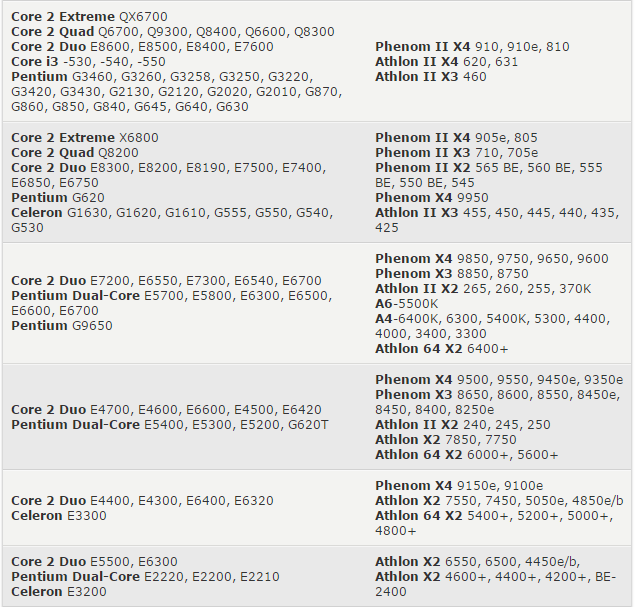
Here is a resource to help you judge if a CPU is a reasonable value or not: the gaming CPU hierarchy chart, which groups CPUs with similar overall gaming performance levels into tiers. The top tier contains the highest-performing gaming CPUs available and gaming performance decreases as you go down the tiers from there.
This hierarchy was originally based on the average performance each CPU achieved in our test suite. We have since incorporated new game data into our criteria, but it should be known that any specific game title will likely perform differently depending on its unique programming. Some games, for example, will be severely graphics subsystem-limited, while others may react positively to more CPU cores, larger amounts of CPU cache, or even a specific architecture. We also did not have access to every CPU on the market, so some of the CPU performance estimates are based on the numbers similar architectures deliver. Indeed, this hierarchy chart is useful as a general guideline, but certainly not as a one-size-fits-all CPU comparison resource. For that, we recommend you check out our CPU Performance Charts.
- See more at: http://www.tomshardware.com/reviews/gaming-cpu-review-overclock,3106-5.html#sthash.69bkXp0H.dpuf
You can use this hierarchy to compare the pricing between two processors, to see which one is a better deal, and also to determine if an upgrade is worthwhile. I don’t recommend upgrading your CPU unless the potential replacement is at least three tiers higher. Otherwise, the upgrade is somewhat parallel and you may not notice a worthwhile difference in game performance. - See more at: http://www.tomshardware.com/reviews/gaming-cpu-review-overclock,3106-5.html#sthash.69bkXp0H.dpuf


Summary
There you have it folks: the best gaming CPUs for the money this month. Now all that’s left to do is compare their performance to your budget before you decide which one is right for you. We even put in the work to help find the best prices.
Also remember that the stores don’t follow this list. Things will change over the course of the month and you’ll probably have to adapt your buying strategy to deal with fluctuating prices. Good luck!
- See more at: http://www.tomshardware.com/reviews/gaming-cpu-review-overclock,3106-5.html#sthash.69bkXp0H.dpuf
Source: Tom's Hardware
List CPUs: Core i7-2600, -2600K, -2700K, -3770, -3770K, -3820, -3930K, -3960X, -3970X, -4770, -4770K, -4790K, -5775C, -5820K, 5930K, -5960X, Core i7-965, -975 Extreme, -980X Extreme, -990X Extreme, Core i5-5675C, -4690K, 4670K, -4590, -4670, -4570, -4430, -3570K, -3570, -3550, -3470, -3450P, -3450, -3350P, -3330, 2550K, -2500K, -2500, -2450P, -2400, -2380P, -2320, -2310, -2300, Core i7-980, -970, -960, Core i7-870, -875K, Core i3-4370, -4170, -4160, -3250, -3245, -3240, -3225, -3220, -3210, -2100, -2105, -2120, -2125, -2130 FX-9590, 9370, 8370, 8350, 8320, 8150, 6350, 4350, Phenom II X6 1100T BE, 1090T BE, Phenom II X4 Black Edition 980, 975, Core i7-860, -920, -930, -940, -950, Core i5-3220T, -750, -760, -2405S, -2400S, Core 2 Extreme QX9775, QX9770, QX9650, Core 2 Quad Q9650, FX-8120, 8320e, 8370e, 6200, 6300, 4170, 4300, Phenom II X6 1075T, Phenom II X4 Black Edition 970, 965, 955 , A10-6800K, 6790K, 6700, 5800K, -5700, -7800, -7850K, A8-3850, -3870K, -5600K, 6600K, -7600, -7650K, Athlon X4 651K, 645, 641, 640, 740, 750K, 860K, Core 2 Extreme QX6850, QX6800, Core 2 Quad Q9550, Q9450, Q9400, Core i5-650, -655K, -660, -661, -670, -680, Core i3-2100T, -2120T, FX-6100, -4100, -4130, Phenom II X6 1055T, 1045T, Phenom II X4 945, 940, 920, Phenom II X3 Black Edition 720, 740, A8-5500, 6500, A6-3650, -3670K, -7400K, Athlon II X4 635, 630, Core 2 Extreme QX6700, Core 2 Quad Q6700, Q9300, Q8400, Q6600, Q8300, Core 2 Duo E8600, E8500, E8400, E7600, Core i3 -530, -540, -550, Pentium G3460, G3260, G3258, G3250, G3220, G3420, G3430, G2130, G2120, G2020, G2010, G870, G860, G850, G840, G645, G640, G630,Phenom II X4 910, 910e, 810, Athlon II X4 620, 631, Athlon II X3 460, Core 2 Extreme X6800, Core 2 Quad Q8200, Core 2 Duo E8300, E8200, E8190, E7500, E7400, E6850, E6750, Pentium G620, Celeron G1630, G1620, G1610, G555, G550, G540, G530, Phenom II X4 905e, 805, Phenom II X3 710, 705e, Phenom II X2 565 BE, 560 BE, 555 BE, 550 BE, 545, Phenom X4 9950, Athlon II X3 455, 450, 445, 440, 435, 425, Core 2 Duo E7200, E6550, E7300, E6540, E6700, Pentium Dual-Core E5700, E5800, E6300, E6500, E6600, E6700, Pentium G9650, Phenom X4 9850, 9750, 9650, 9600, Phenom X3 8850, 8750, Athlon II X2 265, 260, 255, 370K, A6-5500K, A4-6400K, 6300, 5400K, 5300, 4400, 4000, 3400, 3300, Athlon 64 X2 6400+, Core 2 Duo E4700, E4600, E6600, E4500, E6420, Pentium Dual-Core E5400, E5300, E5200, G620T, Phenom X4 9500, 9550, 9450e, 9350e, Phenom X3 8650, 8600, 8550, 8450e, 8450, 8400, 8250e, Athlon II X2 240, 245, 250, Athlon X2 7850, 7750, Athlon 64 X2 6000+, 5600+, Core 2 Duo E4400, E4300, E6400, E6320, Celeron E3300, Phenom X4 9150e, 9100e, Athlon X2 7550, 7450, 5050e, 4850e/b, Athlon 64 X2 5400+, 5200+, 5000+, 4800+, Core 2 Duo E5500, E6300, Pentium Dual-Core E2220, E2200, E2210, Celeron E3200, Athlon X2 6550, 6500, 4450e/b, Athlon X2 4600+, 4400+, 4200+, BE-2400, Pentium Dual-Core E2180, Celeron E1600, G440, Athlon 64 X2 4000+, 3800+, Athlon X2 4050e, BE-2300, Pentium Dual-Core E2160, E2140, Celeron E1500, E1400, E1200