search for it

Showing posts with label Intel. Show all posts

Friday, June 26, 2015

Best Gaming CPUs For The Money: June 2015 (CPUs Hierarchy Chart / Processors Hierarchy Chart)

What about this other CPU that’s not on the list? How do I know if it’s a good deal or not?
This will happen. In fact, it’s guaranteed to happen because availability and prices change quickly. So how do you know if that CPU you have your eye on is a good buy in its price range?
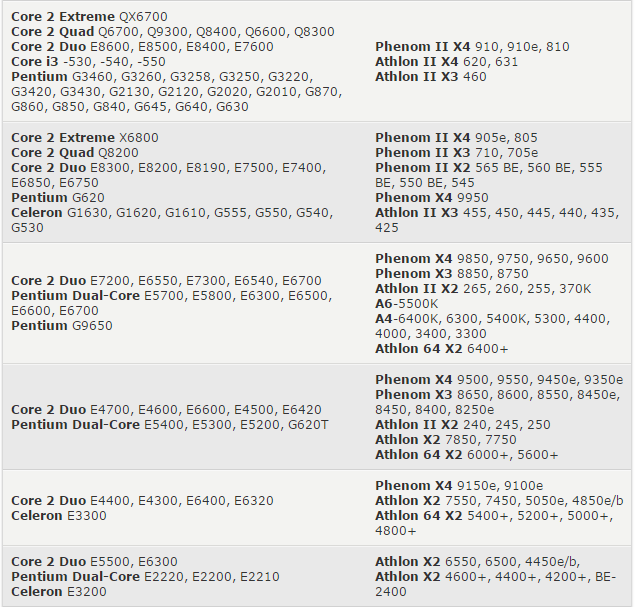
Here is a resource to help you judge if a CPU is a reasonable value or not: the gaming CPU hierarchy chart, which groups CPUs with similar overall gaming performance levels into tiers. The top tier contains the highest-performing gaming CPUs available and gaming performance decreases as you go down the tiers from there.
This hierarchy was originally based on the average performance each CPU achieved in our test suite. We have since incorporated new game data into our criteria, but it should be known that any specific game title will likely perform differently depending on its unique programming. Some games, for example, will be severely graphics subsystem-limited, while others may react positively to more CPU cores, larger amounts of CPU cache, or even a specific architecture. We also did not have access to every CPU on the market, so some of the CPU performance estimates are based on the numbers similar architectures deliver. Indeed, this hierarchy chart is useful as a general guideline, but certainly not as a one-size-fits-all CPU comparison resource. For that, we recommend you check out our CPU Performance Charts.
- See more at: http://www.tomshardware.com/reviews/gaming-cpu-review-overclock,3106-5.html#sthash.69bkXp0H.dpuf
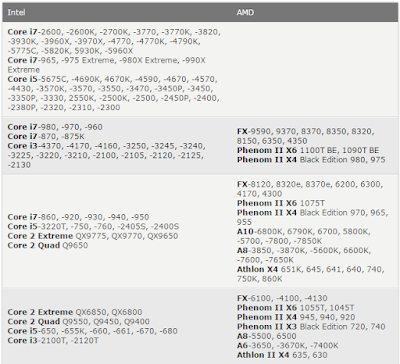
You can use this hierarchy to compare the pricing between two processors, to see which one is a better deal, and also to determine if an upgrade is worthwhile. I don’t recommend upgrading your CPU unless the potential replacement is at least three tiers higher. Otherwise, the upgrade is somewhat parallel and you may not notice a worthwhile difference in game performance. - See more at: http://www.tomshardware.com/reviews/gaming-cpu-review-overclock,3106-5.html#sthash.69bkXp0H.dpuf


Summary
There you have it folks: the best gaming CPUs for the money this month. Now all that’s left to do is compare their performance to your budget before you decide which one is right for you. We even put in the work to help find the best prices.
Also remember that the stores don’t follow this list. Things will change over the course of the month and you’ll probably have to adapt your buying strategy to deal with fluctuating prices. Good luck!
- See more at: http://www.tomshardware.com/reviews/gaming-cpu-review-overclock,3106-5.html#sthash.69bkXp0H.dpuf

Source: Tom's Hardware

List CPUs: Core i7-2600, -2600K, -2700K, -3770, -3770K, -3820, -3930K, -3960X, -3970X, -4770, -4770K, -4790K, -5775C, -5820K, 5930K, -5960X, Core i7-965, -975 Extreme, -980X Extreme, -990X Extreme, Core i5-5675C, -4690K, 4670K, -4590, -4670, -4570, -4430, -3570K, -3570, -3550, -3470, -3450P, -3450, -3350P, -3330, 2550K, -2500K, -2500, -2450P, -2400, -2380P, -2320, -2310, -2300, Core i7-980, -970, -960, Core i7-870, -875K, Core i3-4370, -4170, -4160, -3250, -3245, -3240, -3225, -3220, -3210, -2100, -2105, -2120, -2125, -2130 FX-9590, 9370, 8370, 8350, 8320, 8150, 6350, 4350, Phenom II X6 1100T BE, 1090T BE, Phenom II X4 Black Edition 980, 975, Core i7-860, -920, -930, -940, -950, Core i5-3220T, -750, -760, -2405S, -2400S, Core 2 Extreme QX9775, QX9770, QX9650, Core 2 Quad Q9650, FX-8120, 8320e, 8370e, 6200, 6300, 4170, 4300, Phenom II X6 1075T, Phenom II X4 Black Edition 970, 965, 955 , A10-6800K, 6790K, 6700, 5800K, -5700, -7800, -7850K, A8-3850, -3870K, -5600K, 6600K, -7600, -7650K, Athlon X4 651K, 645, 641, 640, 740, 750K, 860K, Core 2 Extreme QX6850, QX6800, Core 2 Quad Q9550, Q9450, Q9400, Core i5-650, -655K, -660, -661, -670, -680, Core i3-2100T, -2120T, FX-6100, -4100, -4130, Phenom II X6 1055T, 1045T, Phenom II X4 945, 940, 920, Phenom II X3 Black Edition 720, 740, A8-5500, 6500, A6-3650, -3670K, -7400K, Athlon II X4 635, 630, Core 2 Extreme QX6700, Core 2 Quad Q6700, Q9300, Q8400, Q6600, Q8300, Core 2 Duo E8600, E8500, E8400, E7600, Core i3 -530, -540, -550, Pentium G3460, G3260, G3258, G3250, G3220, G3420, G3430, G2130, G2120, G2020, G2010, G870, G860, G850, G840, G645, G640, G630,Phenom II X4 910, 910e, 810, Athlon II X4 620, 631, Athlon II X3 460, Core 2 Extreme X6800, Core 2 Quad Q8200, Core 2 Duo E8300, E8200, E8190, E7500, E7400, E6850, E6750, Pentium G620, Celeron G1630, G1620, G1610, G555, G550, G540, G530, Phenom II X4 905e, 805, Phenom II X3 710, 705e, Phenom II X2 565 BE, 560 BE, 555 BE, 550 BE, 545, Phenom X4 9950, Athlon II X3 455, 450, 445, 440, 435, 425, Core 2 Duo E7200, E6550, E7300, E6540, E6700, Pentium Dual-Core E5700, E5800, E6300, E6500, E6600, E6700, Pentium G9650, Phenom X4 9850, 9750, 9650, 9600, Phenom X3 8850, 8750, Athlon II X2 265, 260, 255, 370K, A6-5500K, A4-6400K, 6300, 5400K, 5300, 4400, 4000, 3400, 3300, Athlon 64 X2 6400+, Core 2 Duo E4700, E4600, E6600, E4500, E6420, Pentium Dual-Core E5400, E5300, E5200, G620T, Phenom X4 9500, 9550, 9450e, 9350e, Phenom X3 8650, 8600, 8550, 8450e, 8450, 8400, 8250e, Athlon II X2 240, 245, 250, Athlon X2 7850, 7750, Athlon 64 X2 6000+, 5600+, Core 2 Duo E4400, E4300, E6400, E6320, Celeron E3300, Phenom X4 9150e, 9100e, Athlon X2 7550, 7450, 5050e, 4850e/b, Athlon 64 X2 5400+, 5200+, 5000+, 4800+, Core 2 Duo E5500, E6300, Pentium Dual-Core E2220, E2200, E2210, Celeron E3200, Athlon X2 6550, 6500, 4450e/b,  Athlon X2 4600+, 4400+, 4200+, BE-2400, Pentium Dual-Core E2180, Celeron E1600, G440, Athlon 64 X2 4000+, 3800+, Athlon X2 4050e, BE-2300, Pentium Dual-Core E2160, E2140, Celeron E1500, E1400, E1200

Thursday, November 24, 2011

Puget Systems Deluge: Revisiting the Art of Custom With X79

Introducing the Puget Systems Deluge
It's been a little while since we've had a Puget Systems desktop in, and so far we haven't yet tested any of their big dog gaming machines. Everything else we've tested, we've liked, but what happens when the fine folks over at Puget Systems pull out all the stops and put together a high end gaming machine? The answer: the Deluge, an X79-based rig in a modified Antec P183, employing a custom liquid-cooling loop. It's big, powerful, and expensive. Did Puget Systems hit another custom out of the park, and is Sandy Bridge-E the enthusiast platform we were waiting for?
While we're used to seeing liquid-cooled systems around here, the Puget Systems Deluge is one of the few we've had in with a fully custom solution. Puget Systems modified the Antec P183 enclosure substantially, planting a 360mm Koolance radiator in the top and adding a window to the side (complete with intake fan). This is really the first tricked-out system we've received from them, and it's a doozy aimed at demonstrating what Intel's new Sandy Bridge-E and X79 platform can do. Needless to say, the rap sheet comes packed with all the latest and greatest hardware.
Puget Systems Deluge L2 Specifications
Chassis Antec P183, Modified
Processor Intel Core i7-3960X
(6x3.3GHz + HTT, Turbo to 3.9GHz, 4.6GHz Overclock, 32nm, 15MB L3, 130W)
Motherboard ASUS Sabertooth X79 (X79 chipset)
Memory 8x4GB Patriot Viper Xtreme DDR3-1600 @ 1500MHz (expandable to 64GB)
Graphics 2x NVIDIA eVGA GeForce GTX 580 1.5GB GDDR5 in SLI
(2x 512 CUDA Cores, 772/1544/4008MHz core/shaders/RAM, 384-bit memory bus)
Hard Drive(s) Intel 510 250GB SATA 6Gbps SSD
Western Digital Caviar Black 2TB 7200-RPM SATA 6Gbps HDD
Optical Drive(s) ASUS BD-RE (BW-12B1ST)
Networking Intel 82579V Gigabit Ethernet
Audio ASUS Xonar DX
Speaker, mic/line-in, surround jacks, optical out for 7.1 sound
Front Side Optical drive
Card reader
USB 3.0
2x USB 2.0
Headphone and mic jacks
Top -
Back Side PS/2
5x USB 3.0
6x USB 2.0
6-pin FireWire
Optical out
2x eSATA
Ethernet
4x DVI-D
2x Mini-HDMI
Speaker, mic/line-in, surround, and optical jacks
Operating System Windows 7 Professional 64-bit SP1
Dimensions 19.9" x 8.1" x 22" (WxDxH)
Extras Card reader
Antec CP1000 PSU
Custom liquid-cooling loop with 360mm radiator
Warranty 1-year parts, Lifetime labor and tech support (extendable by up to three years)
Pricing Starts at $3,945
Review system configured at $7,254
Well, I believe that's officially the most expensive configuration I've yet tested, so if you don't need a car but can afford to buy one, Puget Systems is willing to sell you a tricked out desktop in its stead.
We start at the top with Intel's shiny new top-of-the-line Core i7-3960X. Built on a 32nm process, the new chip features eight hyper-threaded Sandy Bridge cores and 20MB of L3 cache, although in this chip 5MB of L3 and two of the cores are disabled. There's an unlocked multiplier and quad-channel memory, and it runs at a nominal 3.3GHz clock speed. Puget Systems, however, pushed this baby to 4.6GHz, and strapped to the four memory channels is 32GB of Patriot DDR3 in eight 4GB DIMMs, running at 1.5GHz due to a tweaked BCLK.

Monday, November 21, 2011

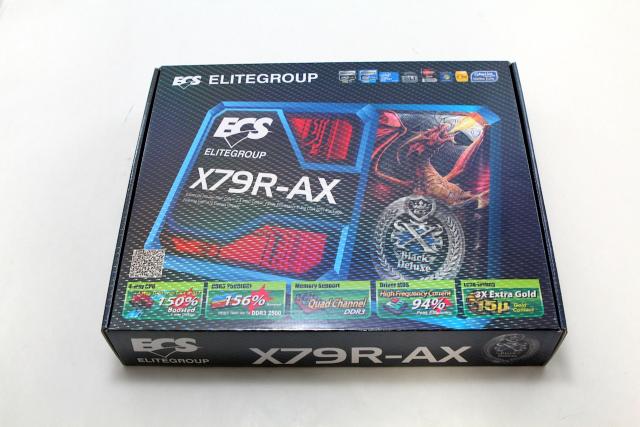
ECS EliteGroup X79R-AX Motherboard Review

The Intel X79 Express Chipset is finally here and every competitor is releasing motherboards exclusively for it. ECS EliteGroup is just one of the major competitors we will be looking at today. They have released their X79R-AX motherboard and it is coming to the market as an entry level motherboard. It comes with great features and a smaller price tag so you can enjoy the new chipset without breaking your wallet.
Since this is a motherboard specifically designed for the new Intel X79 Express Chipset, let’s go over some of the features of this new chipset. First off, it supports the 2nd Gen Intel core i7 and the Intel Core Family Processors in the LGA 2011 Sandy Bridge-E Processors. It is also designed to connect to a DMI interface to peripheral devices. This allows a direct interface between the Intel northbridge and southbridge. What will disappoint some enthusiasts is that their new line of X79 motherboards will not include Intel’s Smart Response Technology.

Other main improvements with this new chipset includes Performance Overclocking, PCIe based Uplink to processor, Up to 8PCIe lanes from PCH, and up to 14 SATA connections (10 ports at 6 Gb/s and/or 8 ports supporting SATA and SAS). Intel has also included Quad Channel DDR3 memory and an overclock memory speed of up to 2666MHz. However, don’t get hyped up on the Quad Channel because in reality it’s just 4 Dual Channel memory sticks. With the addition of these new motherboards will be seeing a lot more SATA ports not only because of the increased allowable connections but also Intel’s Rapid Storage Technology. All these features allow users to easily overclock their motherboards and get higher efficiencies as well. Also, having extra SATA 6Gb/s ports never hurt anyone and it will definitely make use all of the fast transfer speeds of SSDs in the market.

Thursday, November 17, 2011

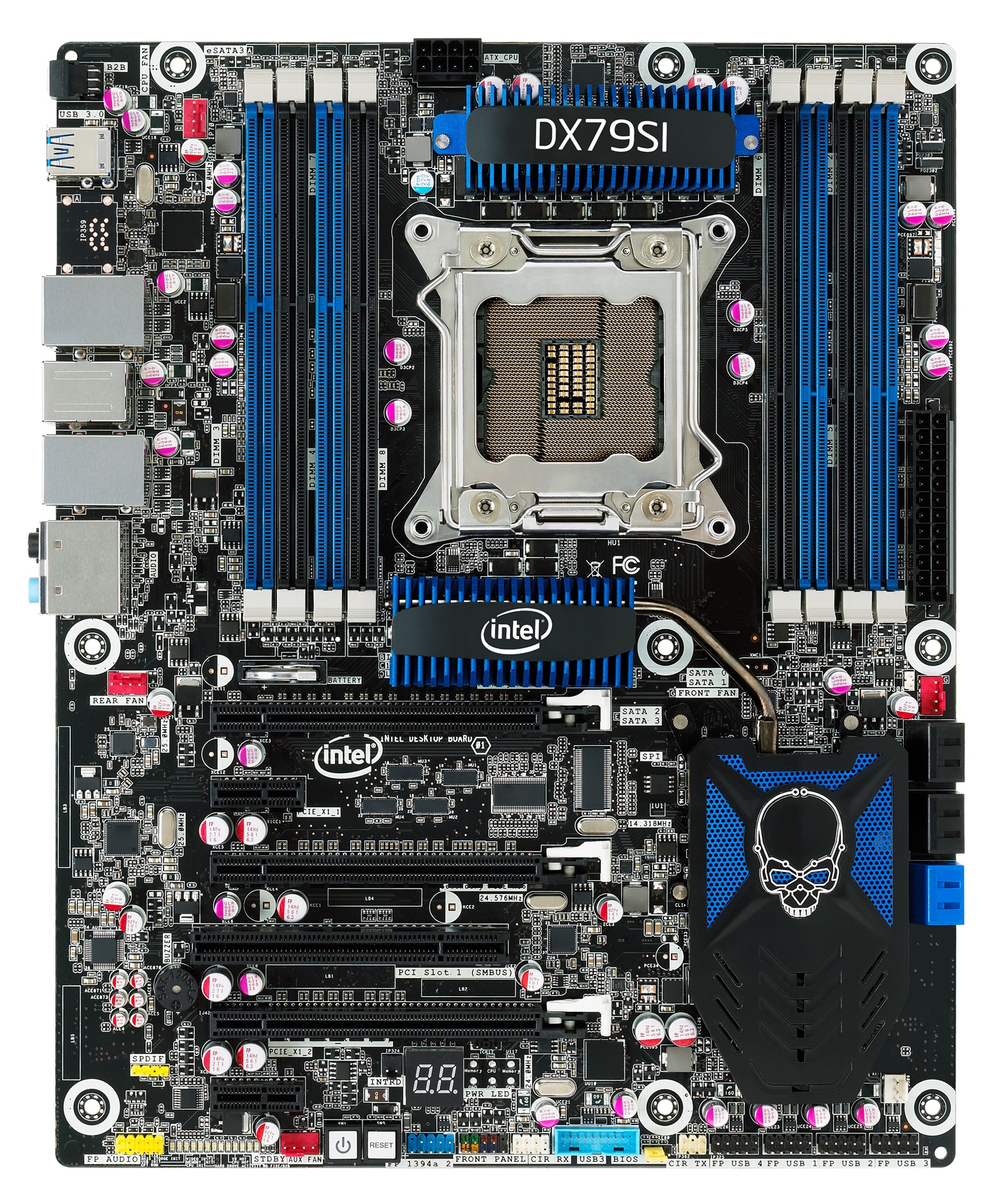
Intel X79 DX79SI Motherboard Review

Reviews of Intel manufactured boards are something of a rarity.  They are not marketed in the same way other motherboards are – almost not at all in comparison.  It could be argued that reviews are only seen coming at the start of a chipset release, coinciding with what we as reviewers get in our media kits from Intel itself.  However, to an enthusiast, it is strange to say that they sell well – consumers or system builders wanting to pair a processor with a board without hassle can go straight in at an Intel motherboard/processor combo.  The question is with an enthusiast platform such as X79, would you really want to deal with an Intel board?
Internally, I have to question how big Intel’s consumer motherboard design team is.  We know their processor and chipset design groups must be comparatively huge to pump out all the products we see on our shelves.  But to produce only one or two consumer motherboards with each chipset, it comes into question whether an Intel board would contain all the features, updates (cf. BIOS later), performance and competitiveness when compared to products from third party vendors, for which motherboards are their main business.  Our last reviews of P55 and H57 show that Intel usually plays it safe – having a working product on their end is more important than bells and whistles.  However in a market where a ‘working product’ should be the de facto standard, Intel invariably has tough competition.
Overview
The DX79SI ‘Siler’ motherboard from Intel is a hard one to summarize.  If I were being lazy, I could merely say ‘it works’, however there is more to that than meets the eye.  In some areas, it gives more than standard – e.g. dual gigabit Ethernet.  But with one hand it gives and the other it takes away, with no option for teaming.
Users of Intel boards of past will notice the continuing ‘skull’ theme in a blue/black miasma of components and connectors, which unlike previous iterations do not light up.  The board sports the bare minimum from the SATA connectors, as well as a lack of thought to the PCIe layout for anyone using more than one GPU.  The PCIe are only rated for Gen 2, which isn’t surprising – other vendors sporting Gen 3 compatibility are outside X79 specifications for now.
The BIOS itself is simple and functional; however do not expect anything spectacular.  While ASUS, Gigabyte, MSI and the test have teams of designers for graphical interfaces, Intel does get left behind in its application of a basic system still.  It is not always clear what is a menu and what is not, however one thing I do like is that the text turns yellow when you change it, making it easy to see what default is.  This makes looking at the Auto OC options a lot easier.  The ‘Back2BIOS’ switch on the IO panel is a feature I hope other vendors adopt as well.
Performance is nothing to shout about, and the Intel software is, while visually quite easy to navigate, ultimately limiting.  There are no ‘easy’ menus, requiring the user to know the ins and outs of a motherboard in order to use it.  No OS fan controls either – those are strictly in the BIOS.  If the media sample I received for this review is indicative of a retail package, while the mouse mat addition is slightly amusing, there are no SATA cables, but an SLI connector and a Bluetooth/wifi module included.
The Intel DX79SI ‘Siler’ motherboard is expected to retail for approximately $290-$300 and comes with a 3-year limited warranty.
Visual Inspection

HP's First Ultrabook is the HP Folio 13, for Business

HP has announced its first ultrabook for the business sector.
Zoom
Wednesday HP revealed its very first ultrabook, the HP Folio 13. Designed for the business sector, the company's new entry will arrive on December 7 with a starting price of $899.99 USD. It will feature the latest Intel Core processors, Intel Rapid Start Technology, USB 3.0 and an embedded TPM Embedded Security Chip to protect data sent via email and stored on the zippy solid state drive.
"This category of product breaks new ground and will be a likely choice for businesses to offer to employees looking for a more consumer-centric experience," said Crawford Del Prete, executive vice president, Worldwide Research Products, and chief research officer, IDC. "We expect Ultrabooks will re-ignite interest in the small form factor PC category, and by 2015 expect 95 million Ultrabooks will be shipping worldwide annually."
According to HP, the ultrabook's battery life promises up to 9 hours -- the highest performance available among Ultrabook devices currently on the market, the company claims. It also measures just 0.71-inches thin, weighs around 3.3 pounds, and sports a 13.3-inch HD BrightView display. There's even a backlit keyboard for mobile users who work in low-light conditions.
"The HP Folio 13 features HP CoolSense technology, which uses advanced hardware and intelligent software for a noticeably cooler notebook," the company said on Wednesday. "The notebook also includes an HP ImagePad for highly accurate, advanced multitouch gesture support."
As for other features, the new ultrabook offers 128 GB of storage via the SSD, an HP TrueVision HD Webcam, Dolby Advanced Audio, a metal chassis and a "full array of ports, including RJ-45 and USB 3.0." The HP Folio 13 can also be configured with a range of Microsoft Windows 7 operating systems, including Windows 7 Professional.
According to various reports, the first model will sport an Intel Core i5-2467M processor, 4 GB of RAM and all the features previously mentioned (although HP didn't specify an actual processor or RAM amount). As for the "array" of ports, images reveal Ethernet, HDMI, USB and an SD card reader on one side, and another USB port on the other side.
Folio 13 users who need a desktop-like environment or additional audio, video, network and USB connectivity can connect the HP Folio 13 to the optional HP USB 2.0 dock, the company said.

 Source: Tom's Hardware

Apple 15-inch MacBook Pro (Late 2011) Review

The early 2011 MacBook Pro is honestly Apple's best effort to date. Only using quad-core CPUs on the 15 and 17-inch models, and offering an optional Thunderbolt Display that can act as a modern day dock makes this platform, particularly the 15-inch model, the perfect candidate for users who want the power and flexibility of a desktop with the portability of a notebook. Apple gets the mobile revolution in more ways than one, and its MacBook Pro/Thunderbolt Display combo is the perfect example of that.
It's this very combination that I've been using, partially since the introduction of the Sandy Bridge MacBook Pro earlier this year (the Thunderbolt Display didn't arrive until later). I've been quite happy with the setup. With the exception of lackluster Quick Sync adoption by Apple and obviously limited GPU options, I have very few major complaints.
Late last month, Apple updated its 2011 MacBook Pro lineup - likely the first and last update before Apple adopts Ivy Bridge in Q2 next year. We got our hands on the new base 15-inch MacBook Pro configuration, which received one of the more substantial upgrades over the previous model. As this is still a fairly minor upgrade, be sure to read our original review of the platform for a deeper drive into all of the aspects of the system.

Sandy Bridge-E: Core i7-3960X Is Fast, But Is It Any More Efficient?

Ironically, when it comes to performance, Intel’s Core i7-3960X is the real Bulldozer. Since its power consumption levels are lower than the Gulftown-based Core i7, it should also deliver amazing performance per watt as well. Is that really the case?
Intel's Sandy Bridge-E design takes the company's 32 nm Sandy Bridge architecture to the next level. As you likely saw in Chris Angelini’s full review on Sandy Bridge-E And X79 Express, the new high-end processor family offers more of almost everything: more cores, more cache, more memory channels, and more PCI Express connectivity, resulting in better benchmark scores in almost every discipline.
While the new processor design, which is now available as the Core i7-3960X and Core i7-3930K (and Core i7-3820 some time next year) delivers more performance, we've already seen the first review machines based on X79 Express lowering power consumption versus the Gulftown/X58 combination thanks to the dual-chip platform layout. AMD might not want to learn in detail what this could mean in terms of performance per watt, since the six-core Core i7-990X was already faster than its flagship FX-8150.

Toshiba Portege Z835: A New Ultrabook Appears

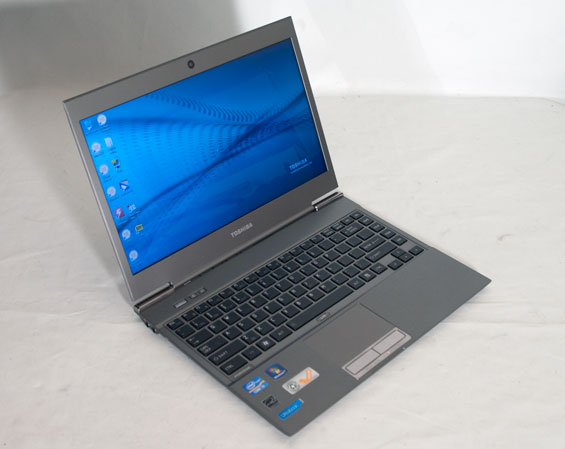
Introducing the Toshiba Portege Z835
Intel's Ultrabook initiative is a curious one, one that's very gradually picking up interest among vendors. We've already had a chance to take a look at the smaller of the two units from the typically early-out-of-the-gate ASUS, and we know there are other ultrabooks out there from Lenovo and Acer, with only Dell opting to sit out of this round, unconvinced of the viability of Intel's plan. Today, in true Toshiba fashion, we get a chance to look at a more budget-oriented (or at least as budget-oriented as an ultrabook can be) unit: Toshiba's entry-level Portege Z835-P330.
Honestly the impressions start before it even gets out of the box, just because the box itself is so unusually small that you wonder how it could possibly hold a computer. But sure enough, once you open it up you'll see Toshiba's sliver of a notebook. Even if you're used to the MacBook Air, getting an ultrabook in your hands is an interesting experience. It barely weighs anything, and the profile is slim to be sure. It's a testament to how technology has evolved that a notebook like this is even possible, but there were definitely sacrifices made.

Dell Inspiron One 2320: Stuck in the Middle With You

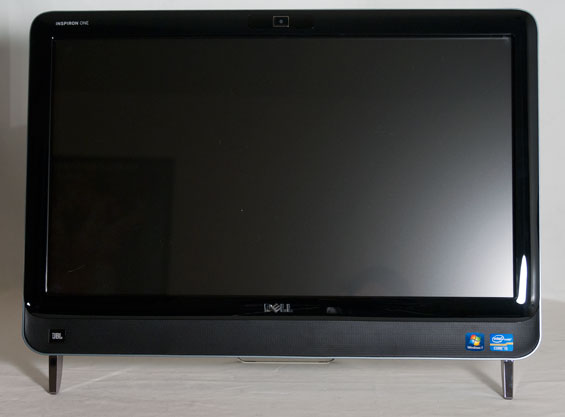
Introducing the Dell Inspiron One 2320
Our last Windows all-in-one review was for HP's TouchSmart 610, an interesting if slightly pricey piece of desktop kit. HP brought a lot of innovation to the table but they couldn't quite patch over the underlying problems with the hardware and software ecosystems that keep a touch-based all-in-one from really achieving all it can. Today we have on hand the Dell Inspiron One 2320, complete with Dell's own touch-based software interface and its own bells and whistles. Is Dell able to smooth over those issues better than HP could, or did they stumble on to some new ones?
What surprised me out of the gate was that Dell opted to go for a much less adjustable stand than any of HP's or even Toshiba's all-in-ones (one of which we have in house); the Inspiron One 2320 has two legs and then it just sort of reclines on its own. That makes it simultaneously more and less user-friendly than the competition; there's something about it that feels more approachable, but at the same time it's really less adjustable than the other ones, and with a TN panel that really spells trouble. Let's hit the specs before we go any further.

Monday, November 14, 2011

Sandy Bridge-E and X79 – The ASUS P9X79 PRO Review

It seems that every few months or so, we get a new socket and a slew of new chipsets from Intel. If we go back as far as 775 (mainstream), in consumer land, we have covered 1366 (enthusiast), 1156 (mainstream) and 1155 (mainstream). This is in contrast to AMD’s backwards compatibility progression of AM2/AM2+ to AM3/AM3+ (if you ignore Llano and Fusion).
Information has been flying around about the new X79 enthusiast platform for some months now, especially when looking for a replacement for X58. Needless to say, X79 aims at high end and high price. There are the main changes that everyone knows and cares about – quad channel memory and 40 PCIe lanes strike high on anyone’s list about X79. Does that mean the chipset is really for those who want >16 GB of memory, or 2/3 way GPU action?

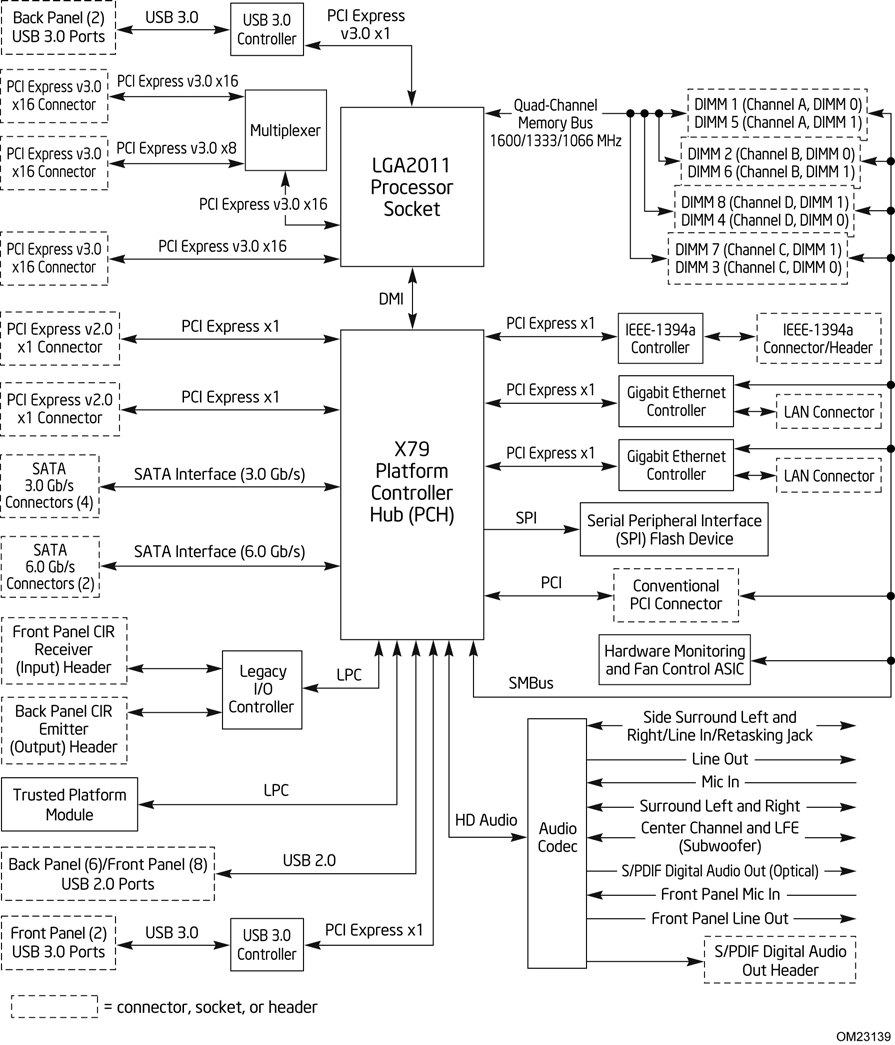
Above is a block diagram of the routing of the LGA 2011 socket and the X79 Platform Controller Hub (PCH), taken from Intel’s DX79SI motherboard information, which will be reviewed in due course. A few points are specific to that board (dual LAN controllers, USB 3.0 implementation), but it covers the basics of most X79. As we can see, the GPU PCIe lanes are split through multiplexers and switches for x16/x8 or even x4 speeds, depending on the motherboard in question. The connection via DMI from the CPU to the PCH gives the motherboard most of the functionality – PCIe x1, SATA, Legacy IO, TPM, USB 2.0, Audio, Ethernet etc. Most of these features are obviously adjustable by the motherboard manufacturer, in terms of quantity (decrease or increase through controllers), or manipulation, for example ASUS’ SSD Caching, as explained in the ASUS review later.

Intel Core i7 3960X (Sandy Bridge E) Review: Keeping the High End Alive

If you look carefully enough, you may notice that things are changing. It first became apparent shortly after the release of Nehalem. Intel bifurcated the performance desktop space by embracing a two-socket strategy, something we'd never seen from Intel and only once from AMD in the early Athlon 64 days (Socket-940 and Socket-754).
LGA-1366 came first, but by the time LGA-1156 arrived a year later it no longer made sense to recommend Intel's high-end Nehalem platform. Lynnfield was nearly as fast and the entire platform was more affordable.
When Sandy Bridge launched earlier this year, all we got was the mainstream desktop version. No one complained because it was fast enough, but we all knew an ultra high-end desktop part was in the works. A true successor to Nehalem's LGA-1366 platform for those who waited all this time.

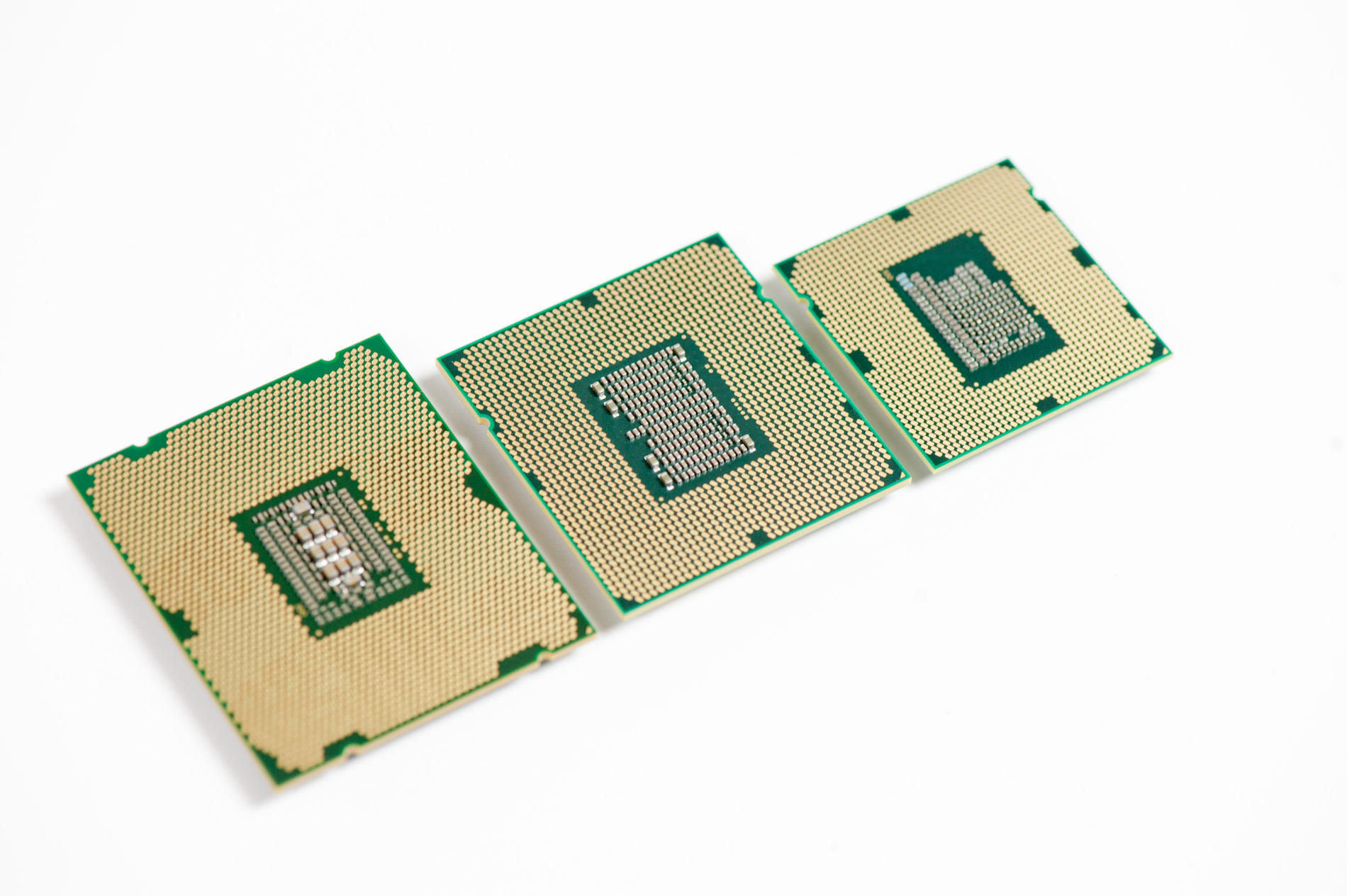
Left to right: Sandy Bridge E, Gulftown, Sandy Bridge
After some delays, Sandy Bridge E is finally here. The platform is actually pretty simple to talk about. There's a new socket: LGA-2011, a new chipset Intel's X79 and of course the Sandy Bridge E CPU itself. We'll start at the CPU.

Friday, November 11, 2011

CPU Chart, Processors Hierarchy 2011

What about this other CPU that’s not on the list? How do I know if it’s a good deal or not?
This will happen. In fact, it’s guaranteed to happen because availability and prices change quickly. So how do you know if that CPU you have your eye on is a good buy in its price range?
Here is a resource to help you judge if a CPU is a reasonable value or not: the gaming CPU hierarchy chart, which groups CPUs with similar overall gaming performance levels into tiers. The top tier contains the highest-performing gaming CPUs available and gaming performance decreases as you go down the tiers from there.
This hierarchy was originally based on the average performance each CPU achieved in our charts test suite using only four game titles: Crysis, Unreal Tournament 3, World in Conflict, and Supreme Commander. We have since incorporated new game data into our criteria, but it should be known that any specific game title will likely perform differently depending on its unique programming. Some games, for example, will be severely graphics subsystem-limited, while others may react positively to more CPU cores, larger amounts of CPU cache, or even a specific architecture. We also did not have access to every CPU on the market, so some of the CPU performance estimates are based on the numbers similar architectures deliver. Indeed, this hierarchy chart is useful as a general guideline, but certainly not as a one-size-fits-all CPU comparison resource. For that, we recommend you check out our CPU Performance Charts.
You can use this hierarchy to compare the pricing between two processors, to see which one is a better deal, and also to determine if an upgrade is worthwhile.

Thursday, November 10, 2011

VGA Chart, Hierarchy Graphics Card 2011


What about this other card that’s not on the list? How do I know if it’s a good deal or not?
This will happen. In fact, it’s guaranteed to happen, because inventory levels and prices change quickly. So how do you know if that card you’ve got your eye on is a good buy in its price range?
Here is a resource to help you judge if a card is a good buy or not. The graphics card hierarchy chart groups graphics cards with similar overall performance levels into tiers. The top tier contains the highest-performing cards available and performance decreases as you go down the tiers from there.
You can use this hierarchy to compare the pricing between two cards, to see which one is a better deal, and also to determine if an upgrade is worthwhile. I don’t recommend upgrading your graphics card unless the replacement card is at least three tiers higher. Otherwise, the upgrade is somewhat parallel and you may not notice a worthwhile difference in performance.
At the request of readers, I have added mobile graphics and integrated chipsets to the hierarchy chart. I want to make it clear that there is very little performance data available for these graphics solutions. While the discrete video cards in the chart are placed in tiers based on a lot of information, many of the mobile and integrated devices in the chart are guesstimates based on their specifications. At worst, I don’t think they’re more than one tier away from their actual performance, but this is something to keep in mind when considering mobile graphics chipsets.

Holiday Budget System Buyers' Guide: Recommended Budget Systems


Recommended Budget Systems
Note the below prices include neither taxes nor shipping as those vary based on the buyer's specific location. The RAM, hard drive, optical drive, power supply, and case recommendations are all, of course, interchangeable between the AMD and Intel-based systems, so mixing and matching those components is unproblematic.
Budget AMD Athlon II X2 system
As noted on previous pages, the AMD motherboards are largely interchangeable and the inclusion of the ASRock board in this list is largely subjective. In this case, it is my opinion that the ASRock board's richer feature set outweighs its shorter warranty.
ComponentProductPrice
CPUAMD Athlon II X2 250 (dual-core 3.0GHz)$60
MotherboardASRock 880GM-LE (HD 4250 IGP)$55
RAMGSkill 4GB DDR3-1333 kit$26
Hard driveSeagate Barracuda 7200.12 500GB$70
Optical driveLite-on iHAS124-04$18
Power supplyAntec Earthwatts 380W$40
CaseBitFenix Merc Alpha$39
Operating systemWindows 7 Home Premium 64-bit$100
 Total:$408
Budget AMD A4-3300 system
It's important to remember that the A4-3300 uses socket FM1 motherboards, so you cannot swap only the processor between these two AMD builds.

Holiday Budget System Buyers' Guide: Motherboards and Features


Motherboards and Features
As mentioned earlier, Cougar Point chipset-based motherboards are fully diversified into every cost niche of the motherboard market. While cutting-edge, flagship motherboards garner the most attention from enthusiasts, inexpensive, no-frills boards are generally just assumed to all be more or less equivalent in performance. But does performance vary between these budget boards? We briefly benchmark a few important motherboard features: LAN, SATA, and USB 2.0 throughput. But before we get to the benchmarks, let's compare features.
I tested eight different budget motherboards—four socket AM3 with AMD chipsets, one FM1 with the A55 chipset, and three based on Intel chipsets (all LGA 1155). Here's a quick rundown of the various features for each board.
ProductPlatform/
Chipset
PriceRAM
slots
Rear USB
ports
LANGraphics
ports
SATA
ports
Expansion
slots
ASRock A55M-HVSFM1 /
A55
$5926 USB 2.01GbVGA, HDMI61xPCIe x16
1xPCIe x1
1xPCI
ASRock 880GM-LEAM3 /
880G + SB710
$5526 USB 2.01GbVGA, DVI61xPCIe x16
1xPCIe x1
2xPCI
Biostar A780L3LAM3 /
760G + SB710
$5024 USB 2.0100MbVGA, DVI41xPCIe x16
2xPCI
Biostar A870U3AM3 /
870 + SB850
$7042 USB 2.0,
2 USB 3.0
1GbVGA, DVI6 (6Gb)1xPCIe x16
1xPCIe x4
2xPCIe x1
2xPCI
MSI 760GM-P33AM3 /
760G + SB710
$5524 USB 2.01GbVGA61xPCIe x16
2xPCIe x1
1xPCI
ASRock H61M-VSLGA1156 /
H61
$5426 USB 2.0100MbVGA41xPCIe x16
1xPCIe x1
Biostar H61MLLGA1156 /
H61
$6024 USB 2.0100MbVGA, DVI41xPCIe x16
1xPCIe x1
2xPCI
MSI H61M-P21LGA1156 /
H61
$5524 USB 2.0100MbVGA41xPCIe x16
3xPCIe x1
One thing to note is that of the above motherboards, Biostar and MSI offer 3-year warranties while ASRock offers a 1-year warranty. As you can see, in general, you'll get more for your money from an AMD-based motherboard than an Intel-based motherboard. That is, none of the Intel boards offer Gigabit ethernet, and only one offers DVI in addition to VGA connectivity; the FM1 board is also the only board with an HDMI port. Do the Intel platforms instead offer better performance? Let's find out.
Benchmarks
While we did not perform thorough testing like when we review a specific motherboard, we tested three important metrics for all eight boards: USB 2.0 performance, SATA throughput, and LAN performance.
USB 2.0 performance
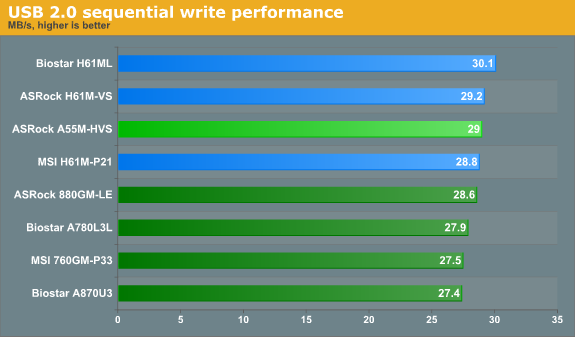
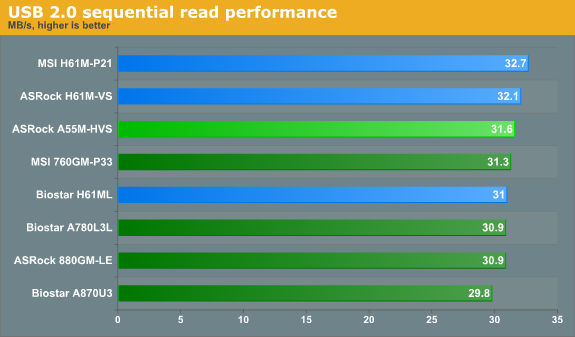
We used a Mushkin Ventura Pro USB 3.0 flash drive and CrystalDiskMark 3 to test the sequential write and read speeds of a 1000MB file. While the Intel boards tend to perform better than the AMD boards, the differences here are very minor and would likely not be noticeable in real world scenarios. The single USB 3.0 equipped board would of course be able to run quite a bit faster with an appropriate USB 3.0 flash drive.
SATA performance
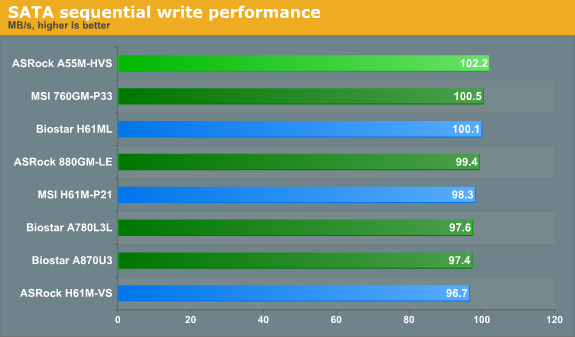
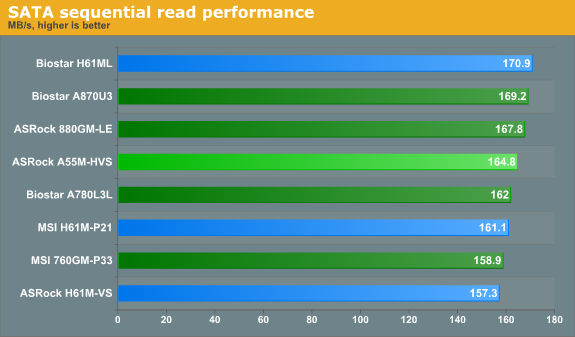
To test SATA performance, we again used CrystalDiskMark 3 to measure the sequential write and read speeds of a 1000MB file—with a Patriot Pyro 120GB SSD. This SSD is one of today's top performers and costs nearly $200—well above the budget sector. However, prices on SSDs will only fall as time passes, and this SSD illustrates what these boards are capable of better than a mechanical HDD. From these results, it's clear that all of the boards perform very similarly in terms of SATA throughput.
LAN performance
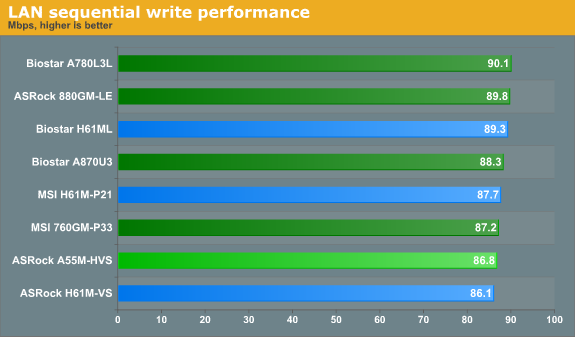
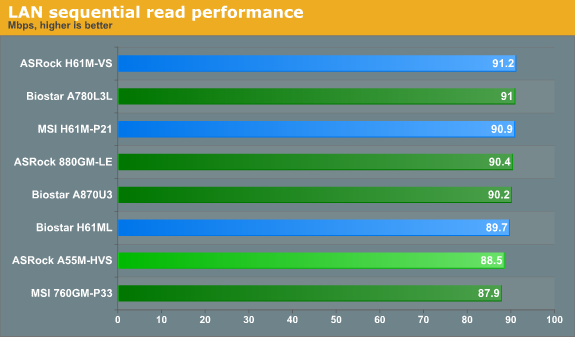
LAN Speed Test is a freeware program designed for testing the network connection between two PCs on a home network. The speed of the transfer is limited by the lowest common denominator on the network, so if you have gigabit ethernet capable computers but a 100 Mbit capable router, you are limited to 100 Mbit transfer. For this test, we use LAN Speed Test to transfer a 1000 MB file across a home network with a 100 Mbps lowest common speed to the same machine each time, in a write/read scenario. It is critically important to note that if you plan on attaching any of the Intel Cougar Point chipset-based boards in this guide to a network, you will be limited to 100 Mbps transfers as none of them have Gigabit adapters.
From these benchmarks, it appears that the budget boards are mostly equivalent performers. I was heartened to experience neither anomalous behaviors nor frustrating issues with any of the boards in the course of testing. Though it's somewhat disappointing to not find a hidden gem, it is useful to know that many budget boards are solid performers—so savvy consumers can watch for sales and rebates.